kage
kage
basedash.com
Design analysis
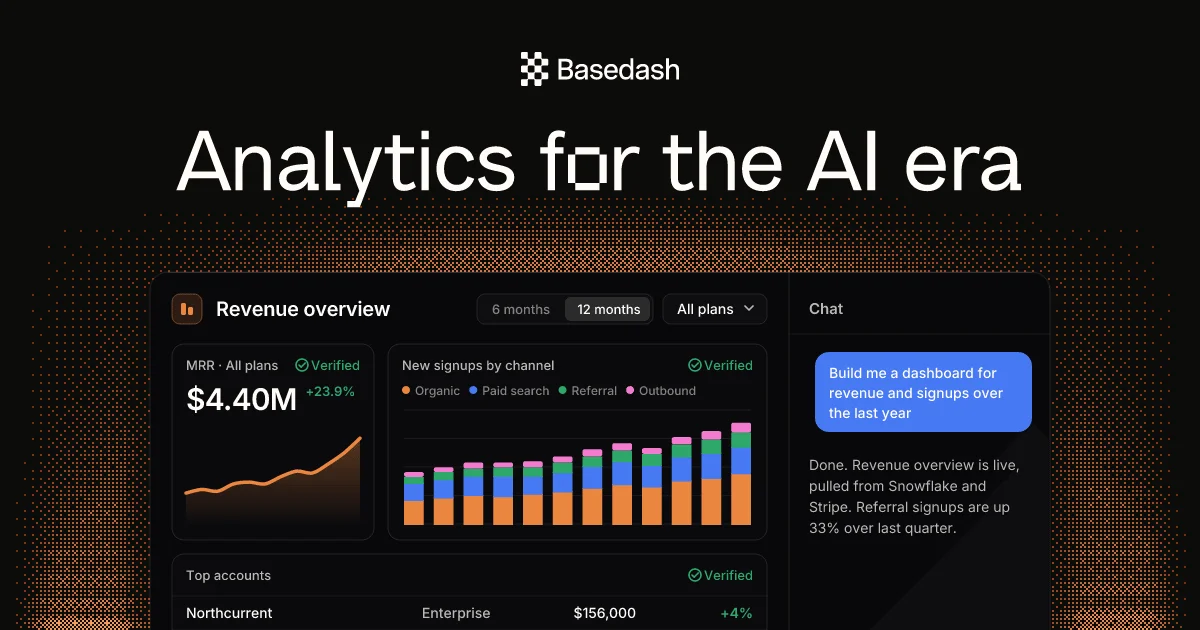
A 1200×630 social card built on a near-black canvas textured with an orange dithered halftone field that fades toward the centre, giving the whole card a retro-terminal glow. Hierarchy runs top-down: a small centred wordmark, an oversized white headline ("Analytics for the AI era" with a glyph cleverly dropped into the "o"), then a cropped product mockup occupying the bottom two-thirds — a dark analytics dashboard with KPI cards, a stacked bar chart and an orange line chart, plus a blue AI-chat bubble on the right. The single orange accent (drawn from the charts into the background texture) against black is what makes it readable at thumbnail size.
Prompt preview
## Reference images

Study these alongside the description below: hierarchy, rhythm, spacing, colour. Build for the product you are asked about, using this design language.

- Screenshot: https://kage-design-assets.t3.tigrisfiles.io/screenshots/basedash-view-only-members/3e4e5de7-b37c-4779-a849-cdcf6659601c-1793253799215.webp
- Design on Kage: https://kage.design/designs/basedash-view-only-members-og-image

# 1200×630 social card (OG image) — dark analytics product with dithered texture

Produce a single **1200×630 px social card image** (Open Graph card for X/Slack/LinkedIn). Render it as HTML/CSS at exactly 1200×630 and screenshot to PNG, or as an SVG converted to PNG. Use placeholder branding and copy — this is inspired by a composition, not a copy of any real product.

## Before you start
Ask the user what product they are promoting, who it is for, and what brand assets they already have (name, logo, colours, type). Wait for the answers before building. Apply everything below to *their* product, not to the reference.

## Canvas composition (top to bottom)
1. **Background (full canvas):** very dark, near-black (#0d0c0b–#151312) base. Overlay a dithered/halftone dot field in a single accent colour (orange ~#e07b3a in the reference; use the user's brand accent) concentrated at the left and right edges and fading toward the centre, so the middle stays clean for text. Subtle scanline or pixel-dither texture is welcome; avoid busy gradients.
2. **Wordmark (top centre, ~y=70):** small logo mark plus product name, centred, ~32–36 px, white, medium weight. Keep it modest — the headline is the hero.
3. **Headline (upper-middle, ~y=170):** one line, very large (~90–100 px), white, tight tracking (-2% to -3%), regular-to-medium weight sans. Optional signature move: replace one glyph (e.g. the "o") with a simple geometric brand glyph. Keep the whole line on a single row.
4. **Product mockup (bottom ~55% of canvas, full-width with side margins ~160 px):** a cropped screenshot-style UI mockup anchored so its bottom edge bleeds off the canvas. Build it as a dark rounded panel (~12–16 px radius, slightly lighter than the background, thin border rgba(255,255,255,0.08)) split into a main area and a narrow right rail:
   - Header row: small icon chip, panel title (~20 px semibold white), and two pill-shaped controls (segmented toggle + dropdown) on the right.
   - Two side-by-side stat/chart cards: left card with a small label, a "verified"-style check + green confirmation, a large KPI number (~34 px) with a green delta, and an area/line chart in the accent colour; right card with a legend of 4 coloured dots and a stacked bar chart using 3–4 chart colours (orange, blue, green, pink).
   - Right rail (~30% width): a panel titled "Chat" containing one filled blue chat bubble (rounded rectangle, white 14 px text) and one plain grey reply paragraph — shows AI interaction.
   - Bottom row partially cropped by canvas edge: a simple table row (name / tier / value / green delta).
5. **Colour budget:** 90% black/near-black and white text, one dominant accent (the brand colour) for charts and the dither field, blue only for the AI chat bubble, green only for positive deltas.

## Design language
- **Focal hierarchy:** logo → headline → product proof. The headline is the largest element; the mockup is cropped to imply a full product beyond the canvas.
- **Type:** one geometric sans family throughout. Scale jump is extreme — 32 px wordmark vs ~95 px headline vs 14–20 px UI text. No serif, no italic, no decoration.
- **Texture as brand:** the dither/halftone pattern is the signature element; keep it low-contrast enough that white text stays legible, and let charts echo the same accent.
- **UI mockup realism:** use real-looking placeholder numbers ($, %, deltas), consistent 12 px card padding, 1 px borders at low alpha, small pill radii (6–8 px) for controls, and muted grey secondary text (#9a938e).
- **No drop shadows or glows** on the main panel; separation comes from the lighter panel fill and hairline borders against the dark field.

## Never
- Do not use the reference product's name, wordmark, copy, or the exact headline "Analytics for the AI era". Use the user's own name and placeholder copy.
- Do not reuse the reference's orange-on-black palette unless the user's brand is orange-on-black; substitute their accent colour.
- Do not copy the specific chart shapes, KPI figures, company names in the table, or the chat dialogue verbatim.
- Do not add photography, illustrations, or stock imagery — the card is typographic + UI mockup only.