kage
kage
plastic.audio
Design analysis
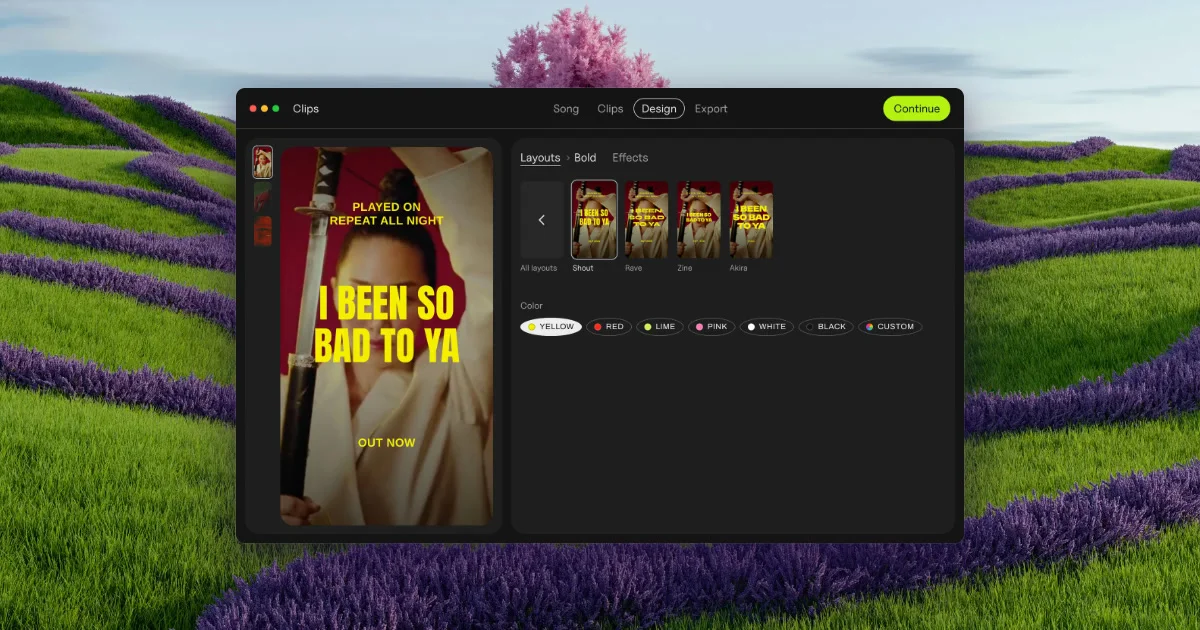
A 1200×630 social card built around a floating dark app window set against a dreamy photographic backdrop of rolling lavender and green hills with a pink tree. The card reads in three layers: the surreal landscape sets the mood, the dark editor UI (with a red portrait preview and yellow poster typography) is the focal point, and the chartreuse "Continue" pill plus the visible tab row ("Song / Clips / Design / Export") signal a real product. The composition works because the saturated yellow-on-red lyric artwork pops hardest against both the near-black chrome and the pastel scenery, while the wide negative space around the window keeps the card readable at thumbnail size.
Prompt preview
## Reference images

Study these alongside the description below: hierarchy, rhythm, spacing, colour. Build for the product you are asked about, using this design language.

- Screenshot: https://kage-design-assets.t3.tigrisfiles.io/screenshots/clips-by-plastic/0f987f96-5643-444b-97da-beb7f0f27d40-1792994474815.webp
- Design on Kage: https://kage.design/designs/clips-by-plastic-og-image

# Product social card (Open Graph image, 1200×630)

## Before you start
Ask the user what they are building, who it is for, and what brand assets they already have (name, colours, type). Wait for the answers — everything below is applied to *their* product, not to the reference. If they have no photography, use a CSS gradient or abstract shape field as the backdrop instead of imagery.

## Goal
Produce a single **1200×630 px Open Graph / social share card** (SVG, or HTML/CSS rendered to PNG). It must work as a thumbnail: one clear focal object, big shapes, no small unreadable text.

## Page structure (canvas composition, top to bottom)
1. **Full-bleed backdrop** (~100% of canvas): a photographic or gradient landscape filling the entire 1200×630 frame. Keep it soft, slightly desaturated pastels — it is atmosphere, not the message. Add a subtle blur or low-contrast treatment so foreground elements separate cleanly.
2. **Floating app window** (~62% of canvas width, ~70% of height, centred with generous air on all sides, bottom edge cropped is fine): a dark rounded-corner (12–16px radius) product UI mockup with a thin near-black chrome. Compose it with:
   - a slim **top bar**: three small window dots on the left, the product name in small text, and a row of step tabs in the centre with the active step in a pill outline;
   - a single **accent action button** (bright pill, right side of the top bar) as the only saturated chrome element;
   - a **left content panel** — the hero artefact (a portrait-ratio preview card, ~2:3) filled with a bold red image/colour block carrying huge condensed display type in the brand accent, plus one small caption line at the top and one at the bottom;
   - a **right control panel** — a small row of thumbnail variants with tiny labels, and a row of pill-shaped colour swatches with labels. Keep this panel sparse and readable; it is texture, not detail.
3. **Nothing else.** No tagline bar, no logo lockup, no footer — the window itself *is* the branding.

## Design language
- **Focal hierarchy**: the hero artefact inside the window wins first (saturated accent on a dark or warm ground), the window chrome reads second, the backdrop third. Only one element may shout.
- **Colour**: pick one brand accent (reference uses chartreuse/yellow ~#d6f318 and a warm red ~#b03030) and a near-black chrome (#1a1a1a). Backdrop stays pastel and low-contrast (greens, lilacs). Accent appears in exactly three places: the hero type, the swatch row, the CTA pill.
- **Type**: one condensed/heavy display face for the hero artefact type (set in caps, tight leading), one neutral sans for all UI microcopy (tab labels, swatch labels). UI text never exceeds ~12–14px at this scale.
- **Shape**: consistent corner radius — large radius on the window and hero card, full-round pills for buttons, tabs and swatches. No hard borders; separate chrome from content with a slightly lighter panel tone (#242424 vs #1a1a1a).
- **Depth**: one soft drop shadow under the window (large blur, low opacity) to lift it off the backdrop; no other shadows.
- **Density**: high contrast in the centre, calm elsewhere. Keep at least 8% canvas margin around the window so the card survives cropping in chat clients.

## Never
- No real logos, wordmarks, product names, screenshot UI text, photography or icon sets from the reference — use placeholder branding and copy for the user's product.
- Never present the result as the reference product; the card must read as the user's own.
- Don't fill the canvas with text: no headline overlays, no URL, no tagline — the composition carries the message.