kage
kage
agentgrid.io
Design analysis
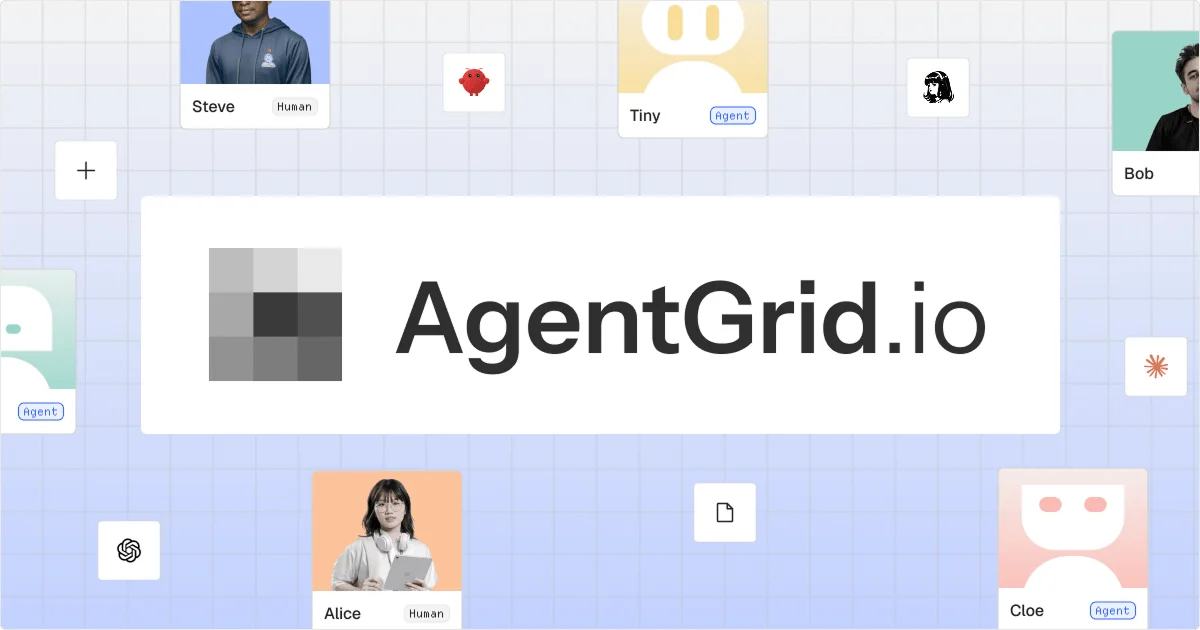
A 1200×630 social card uses a pale blue graph-paper grid as an expansive backdrop, populated by partially cropped human and agent profile cards and small floating assistant icons. A large white horizontal panel dominates the center, pairing a grayscale tiled mark on the left with a bold black wordmark, creating a clear focal hierarchy against the lighter, busier perimeter imagery.
Prompt preview
## Reference images

Study these alongside the description below: hierarchy, rhythm, spacing, colour. Build for the product you are asked about, using this design language.

- Screenshot: https://kage-design-assets.t3.tigrisfiles.io/screenshots/agentgrid-io/88d8e1cd-97a7-4ec7-a590-1f9e9c550984-1792994442372.webp
- Design on Kage: https://kage.design/designs/agentgrid-og-image

## Before you start
Ask the user what they are building, who it is for, and what brand assets they already have (name, colours, type choices, and any logo or imagery). Wait for their answers before designing. Apply everything below to their product, not to the reference.

## Page structure
- **1200×630 canvas:** Build a fixed social-card composition intended for link previews, with a wide 1.904:1 aspect ratio and safe margins around the focal content.
- **Graph-paper background:** Fill the entire canvas with a very pale cool-blue field and a fine square grid, establishing a collaborative workspace atmosphere.
- **Peripheral workspace objects:** Place small, varied human and agent profile cards, avatars, assistant symbols, and document-like tiles around the edges; crop several objects off-canvas so the composition feels like a larger workspace continuing beyond the card.
- **Central identity panel:** Add a large, slightly elevated white horizontal rectangle centered on the canvas, leaving generous padding inside it. This panel should cover much of the middle third and provide a quiet contrast to the active background.
- **Brand lockup:** Inside the central panel, place a simple abstract placeholder mark on the left and a large placeholder product name or headline to its right, aligned on one baseline and sized as the dominant text.

## Design language
- Treat the image as a social card, not a website: make the central identity legible immediately at thumbnail size and keep all essential content inside a safe central area.
- Use a calm, minimal focal panel against a busier contextual perimeter. The center should carry the strongest contrast and the largest type; background objects should remain secondary.
- Use an approximate palette of pale blue `#DDE7FF`, near-white `#FFFFFF`, charcoal `#252525`, soft gray `#A7A7A7`, with restrained pastel accents such as peach `#FFC19B`, mint `#B9E9DD`, and lavender `#B8C7FF`.
- Pair a clean contemporary sans-serif with heavy or semibold weight for the placeholder wordmark/headline. Use generous tracking only for small labels; keep the main lockup large, compact, and highly readable.
- Draw the grid with very thin low-contrast lines, approximately `#C9D6F0` at subtle opacity. Keep the background slightly soft rather than stark or high-contrast.
- Use white cards with thin light-gray borders, modest corner radii around 3–8px, and very soft shadows or no visible shadow. Avoid glossy effects and excessive depth.
- Vary scale and cropping around the edges: mix larger profile cards with tiny standalone tiles and leave open grid areas so the composition does not become uniformly dense.
- If adding motion during generation or preview, keep it nearly imperceptible; the final exported PNG or SVG must be static and crisp.
- Produce the final result as a **1200×630 social card image**, using HTML/CSS rendered to PNG, SVG, or an equivalent image-generation workflow. Include placeholder branding, placeholder copy, and generic avatars or abstract symbols rather than copying any reference assets.

## Never
- Never use the reference product's logo, wordmark, product name, tagline, copy, illustrations, photography, avatars, or icon set.
- Never present the result as AgentGrid or imply an affiliation with it.
- Never make the background more visually dominant than the central identity panel.
- Never omit the 1200×630 export dimensions or design it as a responsive webpage instead of a social card image.