kage
kage
dotsapp.cloudaeri.com
Design analysis
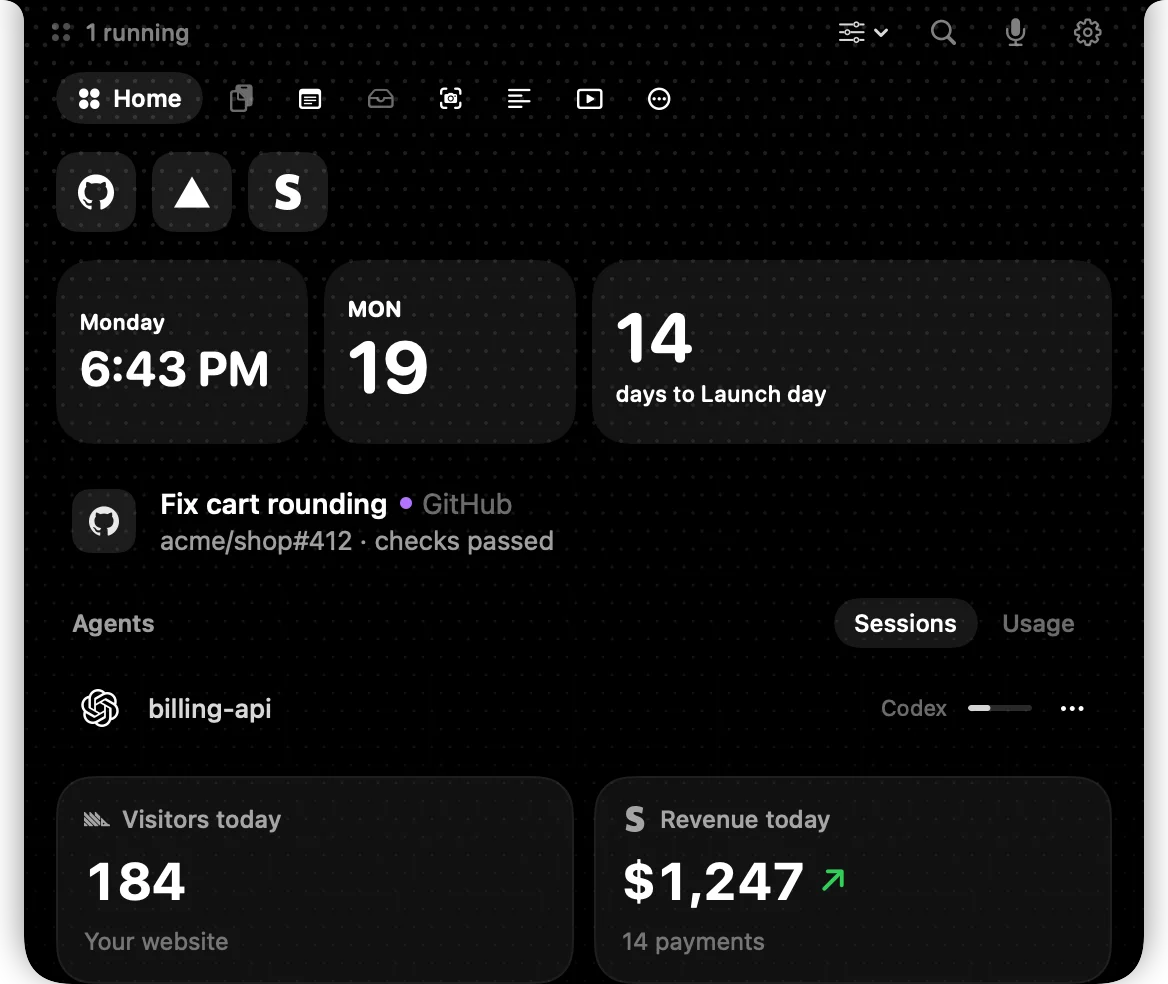
A 1200×630 social card uses a near-black dotted canvas with a cropped workspace interface as the dominant visual, creating immediate product context through dense dashboard geometry. White typography and muted gray panels establish a high-contrast hierarchy: compact navigation and utility icons sit above oversized date, time, countdown, activity, and metric cards, with small purple and green accents providing selective emphasis.
Prompt preview
## Reference images

Study these alongside the description below: hierarchy, rhythm, spacing, colour. Build for the product you are asked about, using this design language.

- Screenshot: https://kage-design-assets.t3.tigrisfiles.io/screenshots/dots/ddeb76d9-bf51-461d-8b3c-b41e3592c621-1792821725621.webp
- Design on Kage: https://kage.design/designs/dots-og-image

## Before you start
Ask the user what they are building, who it is for, and what brand assets they already have, including the product name, logo or wordmark, colours, and preferred typefaces. Wait for their answers before designing. Apply the reference composition to their product rather than reproducing the reference brand.

## Page structure
- **1200×630 canvas:** Create a fixed social-card composition with a near-black background and generous edge-to-edge framing.
- **Background texture:** Add a subtle, evenly spaced dot grid across the canvas so the card feels like a dark workspace rather than a flat rectangle.
- **Top utility strip:** Place a small status label at upper left and a row of restrained monochrome utility controls toward the upper right.
- **Workspace navigation row:** Add a prominent rounded active navigation pill on the left, followed by a compact sequence of simple interface symbols or placeholder controls.
- **Shortcut tiles:** Below the navigation, place a short row of dark rounded-square tiles containing abstract placeholder marks.
- **Primary dashboard row:** Use three rounded dark panels across the width: a time/date panel, a calendar/date panel, and a wider countdown or headline metric panel.
- **Activity row:** Add a single compact activity item beneath the primary panels, combining a small icon tile, bold primary text, a coloured status dot, and muted secondary metadata.
- **Secondary information row:** Include a section label and a compact segmented control, then one lightweight agent/session row with a placeholder icon and right-aligned status details.
- **Bottom metrics:** Finish with two large rounded metric cards, each with a small label, oversized number, and muted supporting line; use one restrained accent for positive change.

## Design language
- Build hierarchy with a very large numeric scale for the main metrics, medium-bold labels for card titles, and small muted metadata; keep all text left-aligned and tightly grouped.
- Change rhythm down the card: compact controls at the top, dense modular dashboard panels in the middle, then larger, simpler metric cards at the bottom.
- Use a near-black canvas around `#050505`, charcoal panels around `#1b1b1d` to `#242426`, white primary text around `#f5f5f5`, and gray secondary text around `#8b8b90`.
- Keep colour mostly monochrome. Reserve a small violet accent near `#a855f7` for status or category emphasis and a small green accent near `#32d466` for positive movement.
- Pair a clean modern sans-serif with tabular-looking or strongly legible numerals. Use compact bold labels, oversized numbers, and avoid decorative type.
- Use consistent rounded rectangles with medium-large corners, approximately 20–28px at 1200×630 scale. Borders should be subtle charcoal strokes around `#303033`; avoid prominent shadows and glossy effects.
- Make the dot grid low contrast and subordinate to the interface, using tiny gray points with low opacity. Keep iconography simple, geometric, and monochrome.
- If adding motion before rendering, limit it to barely perceptible background or cursor-like details; the exported social card must remain immediately legible as a static image.
- Produce the final result as a 1200×630 social card image, using HTML/CSS rendered to PNG, SVG, or an equivalent image-generation workflow. Use placeholder branding, labels, metrics, and copy supplied for the user's product.

## Never
- Do not use the reference product's logo, wordmark, product name, exact copy, or recognizable icon set.
- Do not copy the reference dashboard's branded content or present the result as that product.
- Do not add unrelated photography, illustrations, or marketing slogans that compete with the dashboard composition.
- Do not make the card a generic webpage screenshot; preserve the intentional 1200×630 social-card crop, focal hierarchy, dark dotted canvas, and modular workspace framing.