kage
kage
aibridge.sh
Design analysis
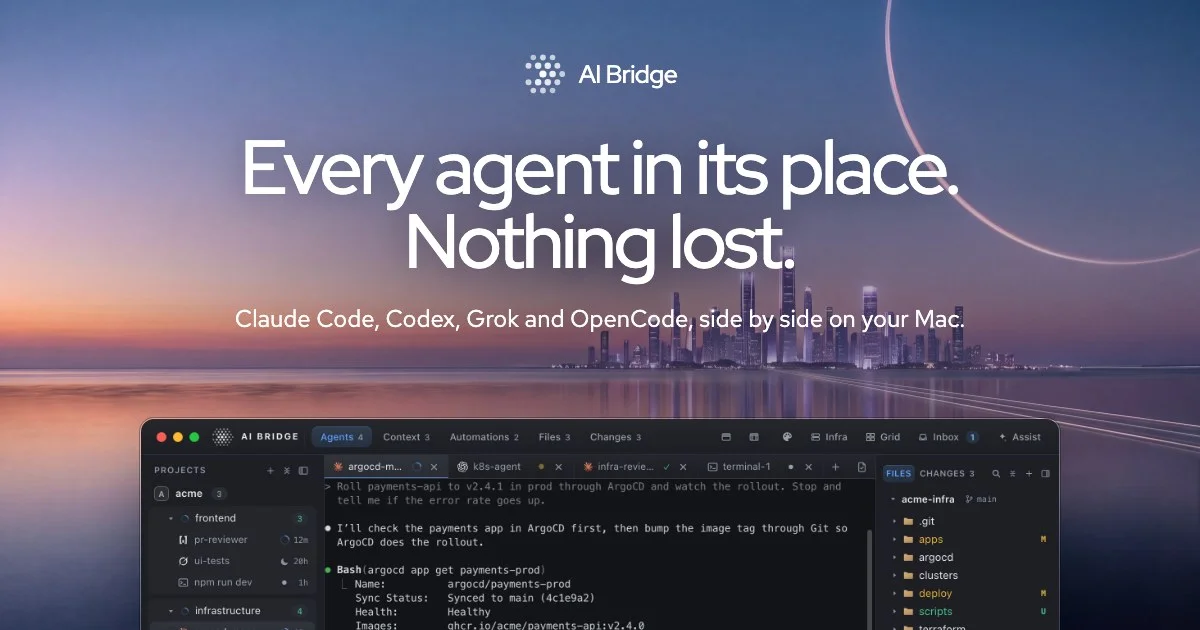
A 1200×630 social card built on a full-bleed dusk photograph: peach horizon glow rising into indigo-blue sky, a city skyline mid-frame, and a thin translucent light arc on the right edge. All type sits in one centered vertical stack — a small dotted-globe wordmark, a two-line headline in a regular-weight geometric sans at roughly 105px with very tight leading, and a translucent-white subline — so hierarchy is carried almost entirely by size, not weight. The bottom third is anchored by a dark macOS app window at about 78% width that is deliberately cropped by the card's bottom edge, giving depth and acting as the product proof without a device frame.
Prompt preview
## Reference images

Study these alongside the description below: hierarchy, rhythm, spacing, colour. Build for the product you are asked about, using this design language.

- Screenshot: https://kage-design-assets.t3.tigrisfiles.io/screenshots/ai-bridge/3995bfc3-79db-408f-b172-83cc2d4bade3-1793080893335.webp
- Design on Kage: https://kage.design/designs/ai-bridge-og-image

## Before you start
Ask the user what product this social card is for, who it is for, the one-sentence promise or tagline it must communicate, and what brand assets they already have (name, logo/icon, brand colours, typeface). Wait for the answers. Everything below is applied to **their** product — the reference card is only the compositional and stylistic template.

## Goal
Produce one 1200×630 Open Graph image. Best delivered as a single HTML file containing a fixed `1200×630` card element, exported to PNG with headless Chrome (Puppeteer or Playwright). A standalone SVG is an acceptable alternative. No interactivity.

## Page structure
The card is five stacked layers, top to bottom:

1. **Background layer (full bleed)** — a dusk gradient: deep indigo-blue at the top (`#2e3d6d`) fading through lavender-steel (`#8a90bd`) into a warm peach horizon glow (`#f0a480`) centered slightly right of middle, then a darker blue-grey water band at the bottom (`#5f739f`). Build it with layered CSS gradients (one linear for the sky, one large soft radial for the horizon glow). If the user has a real photographic background, they may substitute it — keep the same tonal ramp and keep text zones calm.
2. **Decorative arc** — a thin (1–2px), low-opacity (~0.25) white elliptical arc sweeping in from the top-right corner, purely atmospheric, behind all text.
3. **Wordmark row** — at ~56px from the top, horizontally centered: a small (≈22px) dotted/spherical icon + the product name in ~25px medium white type with ~10px gap.
4. **Headline block** — centered around 35–42% of the card height: the promise in two lines, sentence case with periods, white, ~100–108px, weight 500, line-height ~0.98, letter-spacing about −0.02em.
5. **Subline** — ~60px below the headline: one line, ~30–32px, `rgba(255,255,255,0.85)`, weight 400, max-width ~980px, centered.
6. **Product window** — a dark macOS-style app window, ~78% of card width (~940px), horizontally centered, anchored so it is **cropped by the bottom edge** of the card (only top corners rounded). It shows a simplified three-column UI (see below) and reads as product proof, not decoration.

## Design language
- **Hierarchy by scale, not weight:** one geometric sans family carries everything (use the user's brand font; fallback Outfit, Poppins or Inter Tight). Wordmark small, headline enormous, subline mid — the ~4× jump from subline to headline is what makes the card read at thumbnail size. Body weights (400–500) only; no bold shouting.
- **Focal order:** wordmark → headline → subline → UI window. The eye should land on the headline first; the window is the payoff at the bottom, cropped to imply a larger app beyond the frame.
- **Type over photo:** white (`#ffffff`) type with the subline at ~85% opacity. If the headline zone ever lacks contrast, add a very subtle dark radial scrim behind the text block (≤12% opacity) rather than outlining or shadowing the type.
- **Colour system:** sky gradient supplies all ambient colour (`#2e3d6d` → `#8a90bd` → `#f0a480` → `#5f739f`); type is white; the window is near-black (`#0e0e12`, panels `#17171c`, 1px border `rgba(255,255,255,0.10)`, top radius ~14px, shadow `0 30px 80px rgba(20,25,60,0.45)`). Saturated accents (yellow `#e7c66f`, green `#58d38c`, orange `#f2a86f`, blue `#6ea8fe`) appear **only inside the window** as UI signals — never in the headline or background.
- **Window content (placeholder UI):** a ~44px title bar with traffic lights (`#ff5f57`, `#febc2e`, `#28c840`), the product wordmark at left, and a centered pill-tab bar where each tab is `label + count` chip. Body splits into three columns: a ~190px left sidebar of project rows (small icon, name, faint timestamp), a fluid center terminal pane set in monospace (~13px) with a prompt line, one highlighted command block (green dot + command, then `key: value` output rows), and a ~210px right file-tree panel with a small caps header, folder rows using coloured folder chips and tiny status badges. Keep all window text ≥12px and legible at 1200×630; density here should feel real but simplified.
- **Spacing & safety:** keep every text element ≥48px from the card edges; nothing critical in the bottom 8% except the intentional window crop. Generous air between wordmark, headline and subline — the calm spacing is what lets the huge type breathe.
- **Motion:** none — this is a static export. Any hover/preview states the user wants live on the landing page, not the card.

## Never
- Do not use the name "AI Bridge", its dotted-globe logo, its headline copy, or the agent names shown in the reference — replace all of it with the user's brand and copy.
- Do not reuse the reference's city skyline photo or its specific screenshot content; rebuild the window with generic placeholder projects, files and commands.
- Do not present the result as AI Bridge or ship the reference's wording anywhere in the card.
- Do not add device bezels, heavy drop-shadows on text, or extra sections — the composition is exactly one background, one type stack, one cropped window.