kage
kage
buddy.works
Design analysis
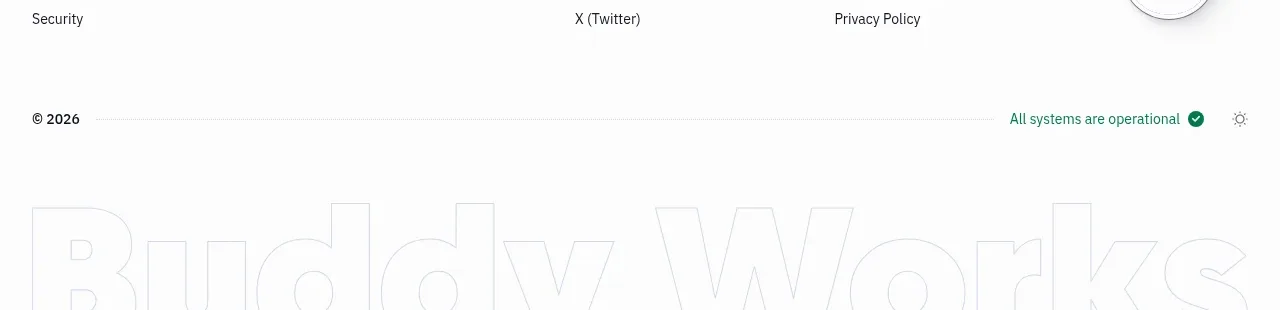
The footer organizes resource, company, and legal links into columns, then closes with copyright, operational status, and a restrained oversized brand treatment.
Prompt preview
## Reference images

Study these alongside the description below: hierarchy, rhythm, spacing, colour. Build for the product you are asked about, using this design language.

- Component: https://kage-design-assets.t3.tigrisfiles.io/components/ai-sandboxes-by-buddy/f0e6e8b3-2b0a-4e1e-b3c7-06d5e5447056-1792130831-11.webp
- Full page it was cut from: https://kage-design-assets.t3.tigrisfiles.io/screenshots/ai-sandboxes-by-buddy/f0e6e8b3-2b0a-4e1e-b3c7-06d5e5447056-1792130620611-full.webp
- Component on Kage: https://kage.design/component/ai-sandboxes-by-buddy-footer

## Before you start
Ask which resource, company, legal, status, and accessibility links the user's product needs, plus whether it has a compliance badge or status page. Then build a footer around those real requirements.

Create a spacious multi-column footer beneath the CTA. Use a thin patterned or ruled divider, four link groups with small uppercase labels, and vertically stacked text links. Add a compliance or trust badge only if the user's product has a legitimate one. Finish with a bottom row containing copyright, a live operational-status indicator, and an optional theme control. Use #FFFFFF or #F8FAFB, near-black #24272D, muted #687079, and a small green status color around #21845D. Links should be 13–14px with clear hover underlines or color changes. Include responsive wrapping, adequate contrast, and a final oversized low-contrast wordmark or decorative text only if it belongs to the user's brand.

Never: use the reference's logo, product name, exact links, compliance badge, illustrations, or imagery.