kage
kage
menlo.ai
Design analysis
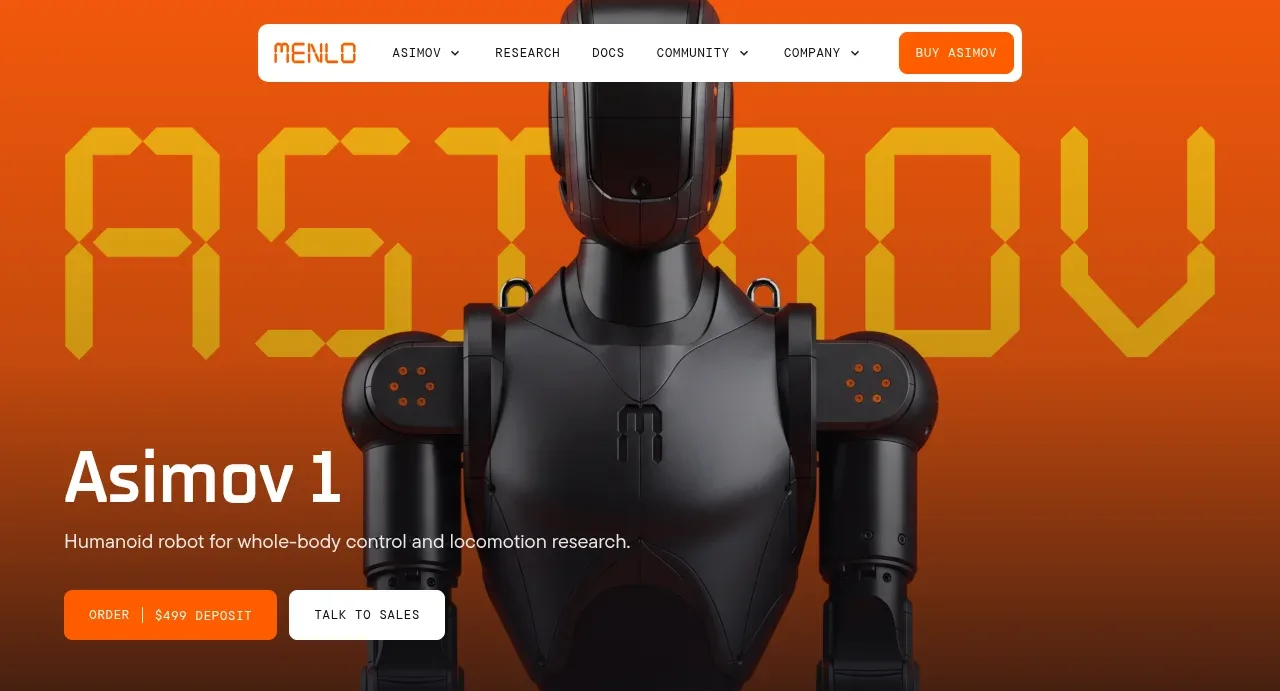
A saturated orange photographic hero establishes the robot immediately, then anchors the page with a concise product statement and two contrasting actions.
Prompt preview
## Reference images

Study these alongside the description below: hierarchy, rhythm, spacing, colour. Build for the product you are asked about, using this design language.

- Component: https://kage-design-assets.t3.tigrisfiles.io/components/asimov-1/d16421bf-78be-4064-9aab-fabd3467d820-1792562772-1.webp
- Full page it was cut from: https://kage-design-assets.t3.tigrisfiles.io/screenshots/asimov-1/d16421bf-78be-4064-9aab-fabd3467d820-1792562736076-full.webp
- Component on Kage: https://kage.design/component/asimov-1-hero

## Before you start
Ask what the user's product, audience, and brand are, then apply the principles below to that product rather than reproducing this reference.

Create a full-width product hero directly beneath the navigation. Use a large, edge-to-edge visual treatment with a warm orange-to-deep-rust background gradient (approximately #ff6500 to #60230f), with the product visual centered and allowed to crop beyond the frame. Place a restrained content block in the lower-left quadrant: a large bold display heading, one short supporting sentence, then a filled orange or light button paired with a quiet outlined button. Preserve strong contrast with white text and keep the content readable over the image via a subtle dark overlay or gradient. The hero should feel tall and cinematic, with a minimum height around 430px on desktop and a deliberate crop on mobile. Buttons should be compact, 10–12px radius, uppercase/technical labels, and show clear hover states.

Never: use the reference logo, product name, exact copy, robot imagery, illustrations, or branded assets.