kage
kage
bestproxy.com
Design analysis
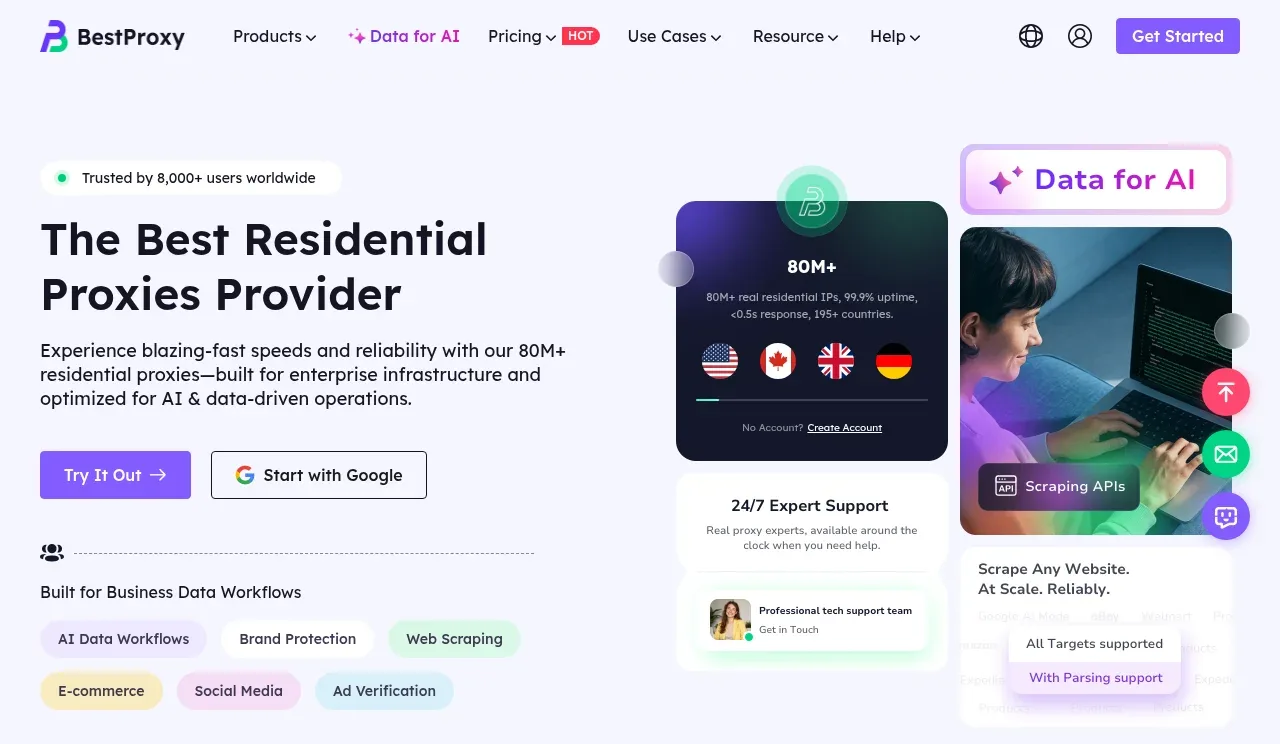
The hero pairs a bold value proposition and dual signup actions with a layered product collage that communicates scale, AI use cases, and support.
Prompt preview
## Reference images

Study these alongside the description below: hierarchy, rhythm, spacing, colour. Build for the product you are asked about, using this design language.

- Component: https://kage-design-assets.t3.tigrisfiles.io/components/bestproxy-com/755647b7-f613-40ca-b212-ae56a9e7b331-1792344031-1.webp
- Full page it was cut from: https://kage-design-assets.t3.tigrisfiles.io/screenshots/bestproxy-com/755647b7-f613-40ca-b212-ae56a9e7b331-1792343992980-full.webp
- Component on Kage: https://kage.design/component/bestproxy-hero

## Before you start
Ask what the user's product, audience, and brand are, then apply the principles below to that product rather than reproducing the reference.

Create a two-column SaaS hero beneath the navigation. Put a small trust eyebrow above a large two-line headline on the left, followed by concise benefit copy and two actions: a filled primary CTA and an outlined OAuth-style secondary CTA. Add a small row of workflow chips below the actions. On the right, build a layered visual system of rounded dashboard and use-case cards, with soft glows, floating status badges, and support snippets; use product UI abstractions rather than a literal screenshot. Use a pale lavender background (#f7f6ff), near-black typography (#171622), purple primary buttons (#7d4df3), mint highlights (#14d6a0), and restrained pink/blue gradients. Use 56–64px desktop headline type, 18px body copy, 8–16px radii, generous 72px vertical padding, and responsive stacking on small screens.

Never: use logos, product names, copy, illustrations, or imagery from the reference.