kage
kage
monish.cc
Design analysis
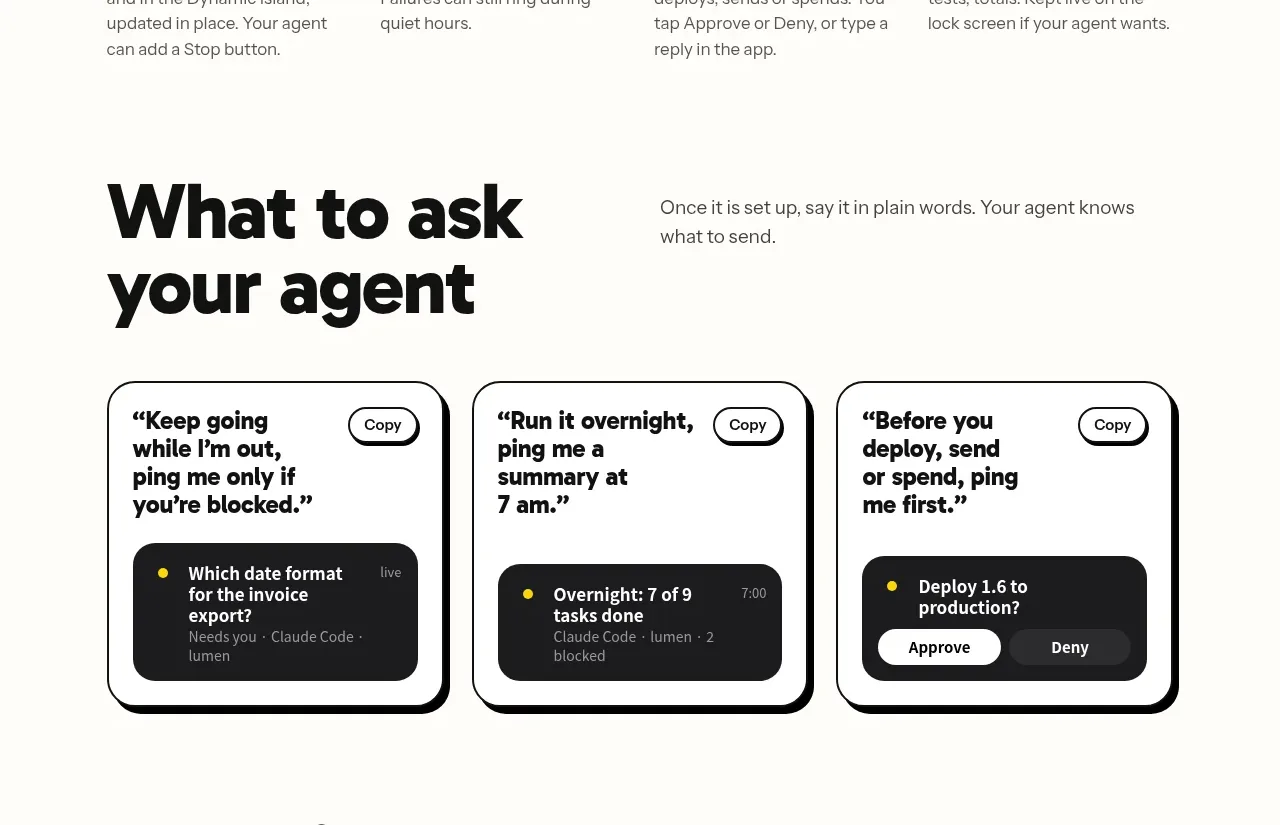
A heading introduces three large rounded cards showing practical prompts, each with a copy control and a miniature result/status preview.
Prompt preview
## Reference images

Study these alongside the description below: hierarchy, rhythm, spacing, colour. Build for the product you are asked about, using this design language.

- Component: https://kage-design-assets.t3.tigrisfiles.io/components/monish/5f3b5863-2239-4773-833d-591642a3d58f-1792821775-6.webp
- Full page it was cut from: https://kage-design-assets.t3.tigrisfiles.io/screenshots/monish/5f3b5863-2239-4773-833d-591642a3d58f-1792821722168-full.webp
- Component on Kage: https://kage.design/component/monish-card

## Before you start
Ask what users commonly want to ask or automate with the product, and what example prompts would demonstrate value without being generic. Apply the principles to those examples.

Build an example gallery with a large section heading and a short explanatory sentence above three equal cards. Each card should have a bold multi-line prompt, a small outlined Copy pill in the top-right, and a dark miniature response/status panel anchored below. Use warm off-white #FFFDF8, near-black #080808, charcoal #202327, yellow #FFD91A, and muted gray #6E6E6E. Give cards 2px black borders, 20–24px radius, hard offset shadows, and generous padding. Make Copy buttons functional with clipboard feedback and ensure the cards stack cleanly on mobile.

Never use logos, product names, copy, illustrations, or imagery from the reference.