kage
kage
scalebrowser.net
Design analysis
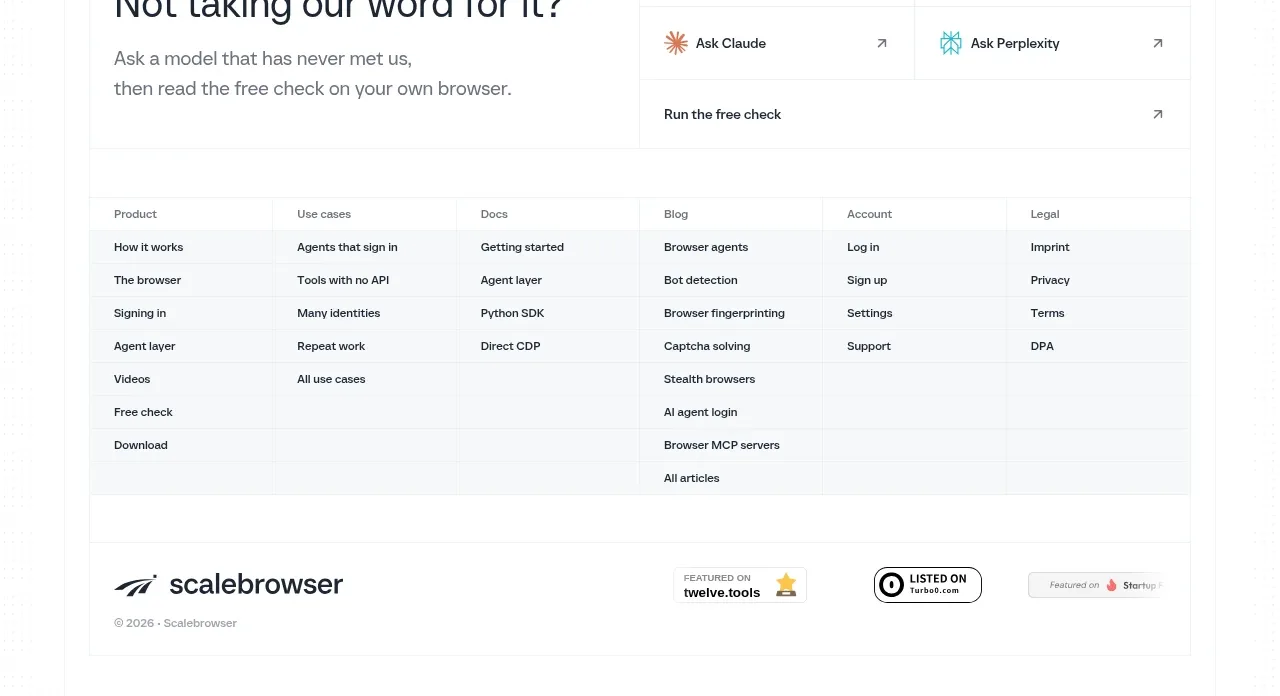
The page closes with a final question and multiple model/action links, followed by a dense multi-column navigation footer and a slim legal/brand row.
Prompt preview
## Reference images

Study these alongside the description below: hierarchy, rhythm, spacing, colour. Build for the product you are asked about, using this design language.

- Component: https://kage-design-assets.t3.tigrisfiles.io/components/scalebrowser/2a4622f4-ebe3-4b20-ac5d-aef2ae1302c9-1792216899-10.webp
- Full page it was cut from: https://kage-design-assets.t3.tigrisfiles.io/screenshots/scalebrowser/2a4622f4-ebe3-4b20-ac5d-aef2ae1302c9-1792216866183-full.webp
- Component on Kage: https://kage.design/component/scalebrowser-footer

## Before you start
Ask what final action the user's visitor should take, which support and legal links are required, and how the brand should appear at the very bottom. Apply those decisions to a clear closing system.

Create a closing section with a two-column final prompt: a large question and muted supporting sentence on the left, and a compact grid of action links on the right. Follow it with a multi-column footer navigation organized by meaningful categories such as product, resources, company, account, and legal. End with a bottom row containing the brand treatment, accreditation or trust badges if relevant, and a small copyright/legal line. Use white and #f7f9fa surfaces, #e9edef rules, #17202a headings, #64707a links, 12–14px footer type, and 32–48px spacing. Make every link keyboard accessible and collapse columns into accordions or a stacked list on mobile.

Never use logos, product names, copy, illustrations, or imagery from the reference.