kage
kage
apps.marcoluthi.com
Design analysis
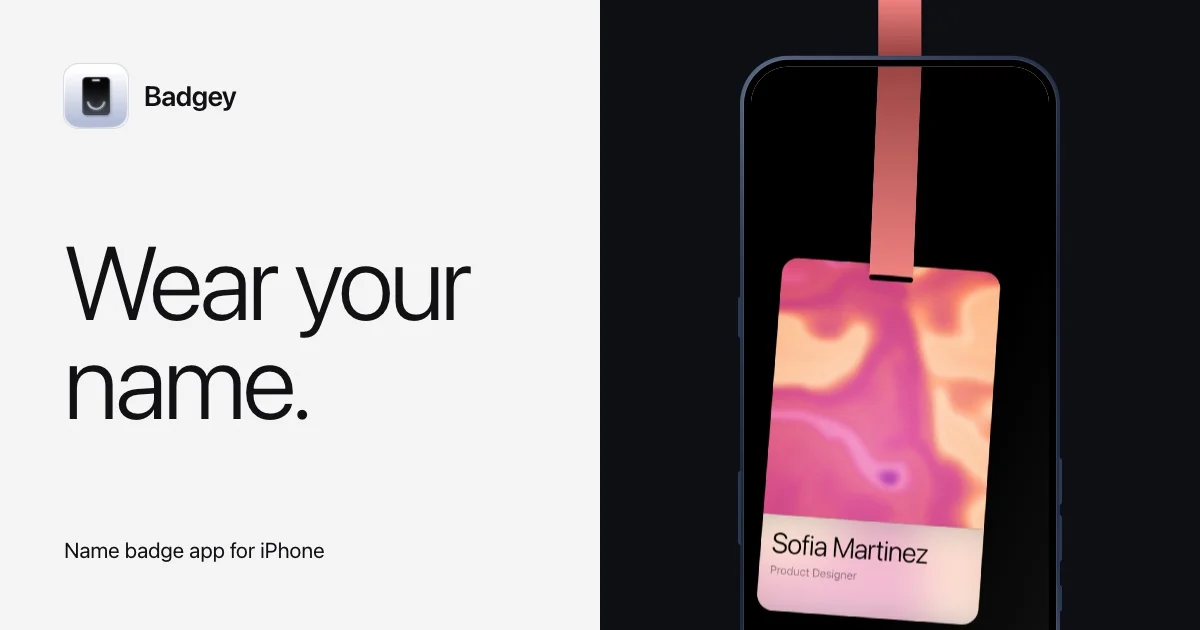
A 1200×630 social card built on a hard vertical split: a warm off-white left panel carries the wordmark lockup, an oversized two-line headline and a small caption pinned to the bottom edge, while a near-black right panel holds a portrait iPhone with a coral lanyard strap running in from the top edge and terminating in a warm gradient badge on the screen. Hierarchy is driven almost entirely by type scale — one neutral grotesque doing all the work, from ~110px headline to ~26px caption — with the warm accent confined to the strap and badge so the product reads as the single colourful element. The dark/light split mirrors the product story: the badge (light, warm, personal) glowing inside a dark phone.
Prompt preview
## Reference images

Study these alongside the description below: hierarchy, rhythm, spacing, colour. Build for the product you are asked about, using this design language.

- Screenshot: https://kage-design-assets.t3.tigrisfiles.io/screenshots/badgey/d5e12c2c-fb59-4df2-aa04-7d10fea0c2f9-1792994500592.webp
- Design on Kage: https://kage.design/designs/badgey-og-image

## Before you start
Ask the user what they are building, who it is for, and what brand assets they already have (name, colours, typeface). Wait for the answers. Everything below is applied to *their* product — the reference composition is Badgey's social card, but the name, icon, headline and badge content must be replaced with the user's own placeholder branding and copy.

## Goal
Produce a **1200×630 Open Graph / social share card** as a single image. Easiest route: an HTML/CSS file sized exactly 1200×630 (fixed `width:1200px; height:630px`, `overflow:hidden`), rendered to PNG with a headless browser or a tool like `playwright screenshot` / `puppeteer`. An SVG of 1200×630 is equally acceptable. No responsive behaviour needed — this is a fixed-size asset.

## Page structure
- **Canvas**: a hard vertical 50/50 split. Left half is a warm off-white field; right half is near-black. No divider line — the colour change itself is the edge.
- **Left panel, top**: a compact brand lockup pinned to the top-left corner with generous margin (~64px from top/left). A rounded-square app icon (~64px, subtle inner shadow, single glyph inside) beside a short wordmark in a semibold grotesque at ~28px.
- **Left panel, middle**: the headline — two short lines of very large type (~100–110px), sentence case, ending in a period, vertically centred in the panel and left-aligned on the same margin as the lockup. Tight leading (~0.95–1.0) and near-black colour.
- **Left panel, bottom**: a one-line descriptor at ~24–26px, regular weight, muted dark grey, anchored near the bottom edge (~56px up) on the same left margin. This anchors the panel and completes a top → middle → bottom reading order.
- **Right panel**: a portrait phone mockup, centred horizontally, tall enough that it bleeds off the bottom edge of the canvas. The phone body is near-black with a subtle lighter edge and large corner radius (~40px); the screen is dark.
- **Right panel, focal detail**: a lanyard strap in the brand accent colour runs vertically from the top edge of the canvas *into* the phone screen, widening slightly and ending in a rounded badge card that fills most of the screen. The badge card is the only warm, colourful object on the card: a two-stop gradient upper area and a light solid lower strip carrying a name in ~34px dark type and a role line in ~16px muted grey.

## Design language
- **One idea per half**: left half is typography, right half is product. Keep them visually independent — no text overlaps the device.
- **Hierarchy by scale, not weight**: one neutral grotesque family (Inter / Neue Haas style) throughout. Contrast comes from the jump between ~110px headline, ~28px wordmark and ~26px caption, with weight changing only slightly (medium headline, regular caption).
- **Colour discipline**: three tones total — warm off-white `#F4F1EC`, near-black `#151412`, and one warm accent family for the strap and badge gradient (e.g. `#E0785E` strap; gradient from `#E879B0` pink to `#F2A25C` peach). The accent appears *only* on the product element, so the eye lands there after the headline.
- **Rhythm**: big top margin, even bigger gap before the headline, deliberate emptiness below the caption — generous whitespace on the type panel is what makes the device panel feel dense and vivid by contrast.
- **Edges and depth**: flat fields everywhere; depth only via soft, low-opacity shadow on the phone and a faint inner shadow on the app icon. Corner radius is consistent (rounded icon, rounded phone, rounded badge) and generous.
- **The strap as a connective device**: one vertical element crossing from canvas edge into the screen ties the mockup to the frame — reuse this trick (a ribbon, cable or card sliding in from an edge) rather than floating the device in space.
- **Copy tone**: headline is 3–4 words plus a period; descriptor is one plain line naming the platform ("… app for iPhone" pattern).

## Never
- Do not use the Badgey name, wordmark, app icon artwork, or the "Sofia Martinez / Product Designer" copy — invent placeholder brand and badge content for the user's product.
- Do not copy the exact "Wear your name." headline; write a new short headline for the user's product in the same scale and tone.
- Do not add logos, photography, illustrations or icon sets from the reference, and never present the result as Badgey.