kage
kage
meetpaw.app
Design analysis
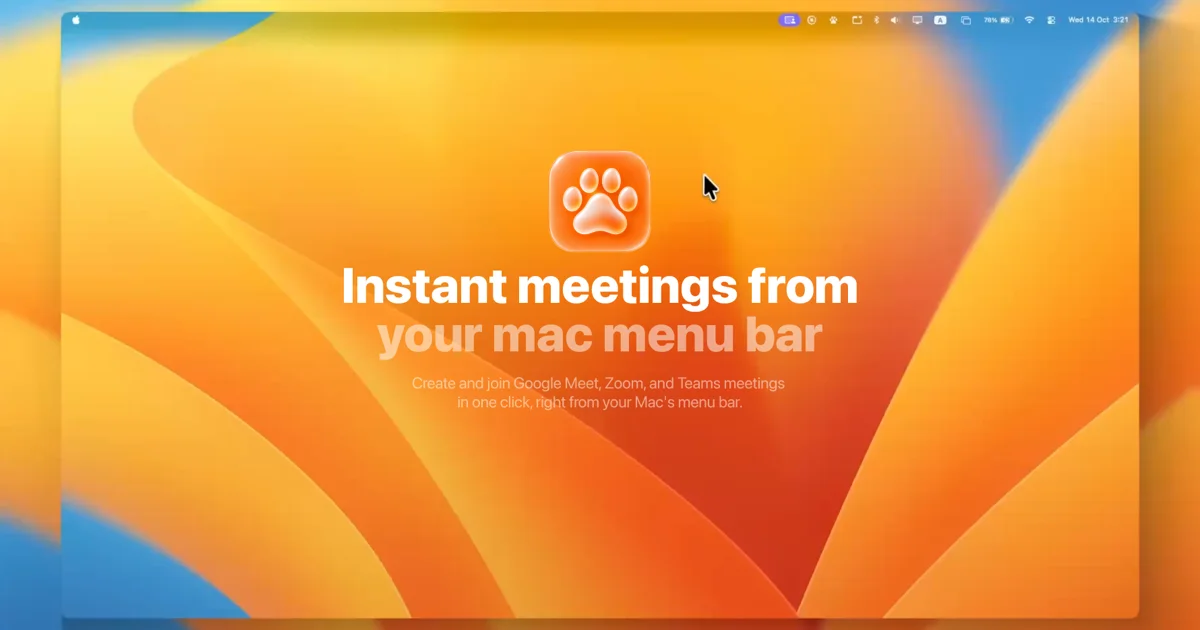
A 1200×630 social card framed as a macOS desktop screenshot: a large rounded-corner "screen" floats on a blurred warm-orange background, filled with a flowing abstract wallpaper of orange, red and blue curves with a mock menu bar strip across the top. Hierarchy is centred and vertical: glossy paw-print app icon, a two-line bold white headline where line one is fully opaque and line two fades to ~40% opacity, then a small two-line white subheadline. Type is a heavy geometric sans (SF-Pro-like) against saturated colour; legibility comes from size and weight rather than overlays. The mock menu bar adds product-context wit (it depicts the menu bar the product lives in) without cluttering the focal stack.
Prompt preview
## Reference images

Study these alongside the description below: hierarchy, rhythm, spacing, colour. Build for the product you are asked about, using this design language.

- Screenshot: https://kage-design-assets.t3.tigrisfiles.io/screenshots/meetpaw/888f9bf6-ade7-4113-8967-14169d8dfaba-1792389629694.webp
- Design on Kage: https://kage.design/designs/meetpaw-og-image

# Build a 1200×630 Open Graph social card

## Before you start
Ask the user: what product is this card for, who is it for, what headline/tagline should appear, and what brand assets they have (logo/icon, colours, typeface). Wait for the answers. Apply everything below to their brand, not to the reference product.

## Deliverable
Produce a single 1200×630 image — either an SVG, or an HTML/CSS file rendered to PNG (e.g. via Playwright/puppeteer screenshot at exact 1200×630 viewport).

## Page structure
1. **Canvas backdrop**: a blurred, saturated abstract gradient field (2–3 warm or brand-hued flowing shapes) filling the whole 1200×630, slightly darker/softer than the inner panel.
2. **Inner "screen" panel**: a large rounded-corner rectangle (~85–90% of canvas width, full height minus a thin margin) that reads as a macOS desktop: fill it with an abstract wallpaper of large sweeping curves in 3–4 brand colours, and add a slim mock menu bar strip along its top edge (translucent, tiny placeholder glyphs on the right, clock on the far right).
3. **Focal stack, centred vertically and horizontally**:
   - App icon: a rounded-square, glossy/skeuomorphic-feel icon (~120px) centred near the upper third.
   - Headline: two lines, very bold geometric sans, ~64–72px, white, centred. Line 1 at full opacity; line 2 at ~40% opacity for a fading-echo effect.
   - Subheadline: two short lines, ~18–20px, white at ~70% opacity, ~24px below the headline.
4. No CTA, no URL, no secondary elements — keep the stack to icon + headline + subline.

## Design language
- One vertical centred focal column; everything else is atmosphere.
- Colour is the design: saturated gradient shapes (e.g. #F5A623, #E8542A, #3E8DE0, #F0C64A) doing all the visual work; legibility from white type + weight, not dark overlays.
- Heavy geometric sans throughout; scale jump from 20px subline to ~70px headline creates the hierarchy.
- Rounded corners (~20px) on the screen panel and icon echo macOS styling; soft blurred edges on the backdrop create depth.
- Two-opacity headline echo gives motion and rhythm without extra elements.

## Never
No real logos, wordmarks, product names, or copy from the reference; use placeholder branding and copy supplied by the user. Do not reproduce the paw icon or the exact wallpaper colours verbatim — use the user's own brand palette and icon.