kage
kage
menlo.ai
Design analysis
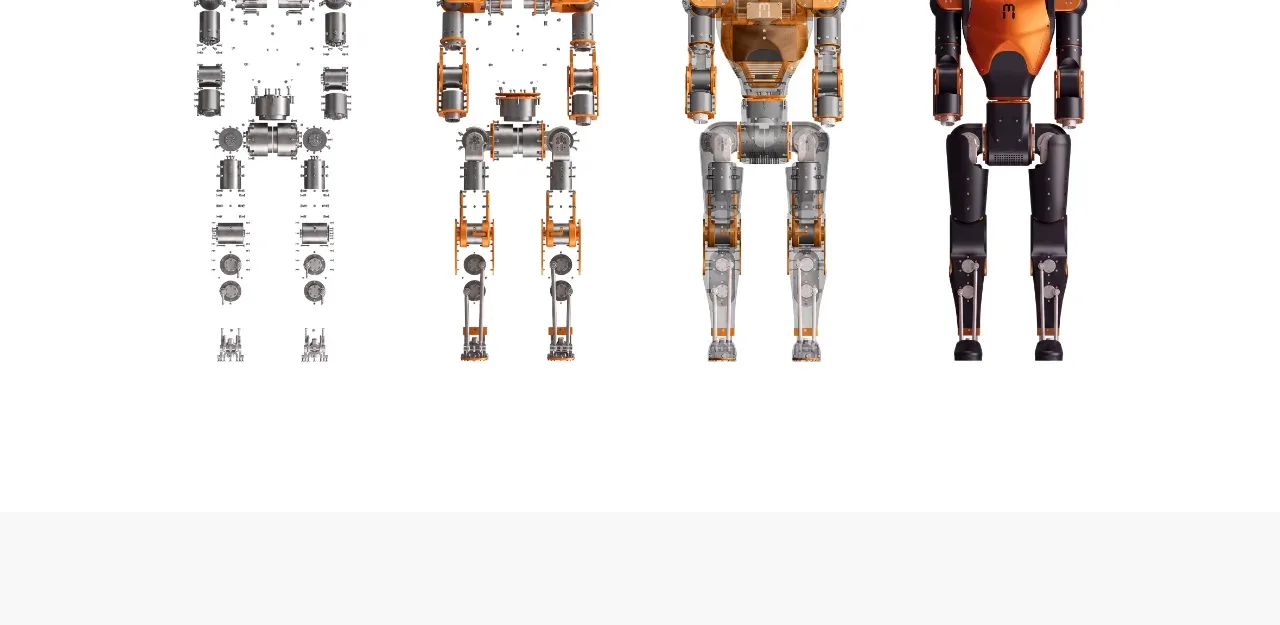
A wide visual strip shows the product progressing through component or prototype states, functioning as a compact gallery beneath the purchase prompt.
Prompt preview
## Reference images

Study these alongside the description below: hierarchy, rhythm, spacing, colour. Build for the product you are asked about, using this design language.

- Component: https://kage-design-assets.t3.tigrisfiles.io/components/asimov-1/d16421bf-78be-4064-9aab-fabd3467d820-1792562775-7.webp
- Full page it was cut from: https://kage-design-assets.t3.tigrisfiles.io/screenshots/asimov-1/d16421bf-78be-4064-9aab-fabd3467d820-1792562736076-full.webp
- Component on Kage: https://kage.design/component/asimov-1-gallery

## Before you start
Ask what the user's product, audience, and brand are, then apply the principles below to that product rather than reproducing this reference.

Create a simple product-evolution gallery on a white background. Display four or more evenly spaced visual states along a shared baseline, showing progression from abstract parts or early prototype to a refined product. Keep the images isolated on white or very pale grey with consistent scale and generous horizontal spacing. Avoid captions unless they clarify the stages; if captions are used, keep them small and muted. The gallery should be horizontally scrollable on narrow screens, with no heavy chrome, and should preserve image aspect ratios. Use subtle fade-in or hover scale only if it does not distract from the sequence.

Never: use the reference logo, product name, exact copy, prototype images, illustrations, or branded assets.