 kage
kage
apps.marcoluthi.com

Design analysis
A single product demonstration is given room to breathe: the phone mockup sits above a short benefit statement, making the physical interaction immediately understandable.
Prompt preview
## Reference images

Study these alongside the description below: hierarchy, rhythm, spacing, colour. Build for the product you are asked about, using this design language.

- Component: https://kage-design-assets.t3.tigrisfiles.io/components/badgey/bd3040e3-7307-4350-8c61-c2e3eef7de7a-1792994546-2.webp
- Full page it was cut from: https://kage-design-assets.t3.tigrisfiles.io/screenshots/badgey/bd3040e3-7307-4350-8c61-c2e3eef7de7a-1792994501677-full.webp
- Component on Kage: https://kage.design/component/badgey-feature-grid

## Before you start
Ask what the user's product does and which physical or digital interaction is most important to demonstrate. Use the user's own product language and visual system.

Build a tall, centered feature section with one prominent device or interface preview followed by a short headline and two-line explanation. Use a neutral background and a generous vertical rhythm. The preview should be centered at roughly 150–220px wide on desktop, with enough top and bottom whitespace to feel editorial rather than crowded. Use a 34–40px lightweight heading and 15–17px muted supporting copy. Keep the text block narrower than the device and center-align it.

If the product has a physical interaction, show it through a realistic but restrained mockup or animation; otherwise use a clean UI preview. Add a subtle fade/slide reveal only if it improves comprehension, and respect reduced-motion settings. Make the section responsive by shrinking the preview while keeping the text comfortably readable.

Never: use logos, product names, copy, illustrations, or imagery from the reference.
More components

 Advanced data-room features
Papermark Data Rooms · Feature grid
Advanced data-room features
Papermark Data Rooms · Feature grid
 Data-room education and security overview
Papermark Data Rooms · Feature grid
Data-room education and security overview
Papermark Data Rooms · Feature grid
 Workflow demonstrations
Papermark Data Rooms · Feature grid
Workflow demonstrations
Papermark Data Rooms · Feature grid

 Effects and customization panel
Clips by Plastic · Feature grid
Effects and customization panel
Clips by Plastic · Feature grid
 Problem statement
Clips by Plastic · Feature grid
Problem statement
Clips by Plastic · Feature grid
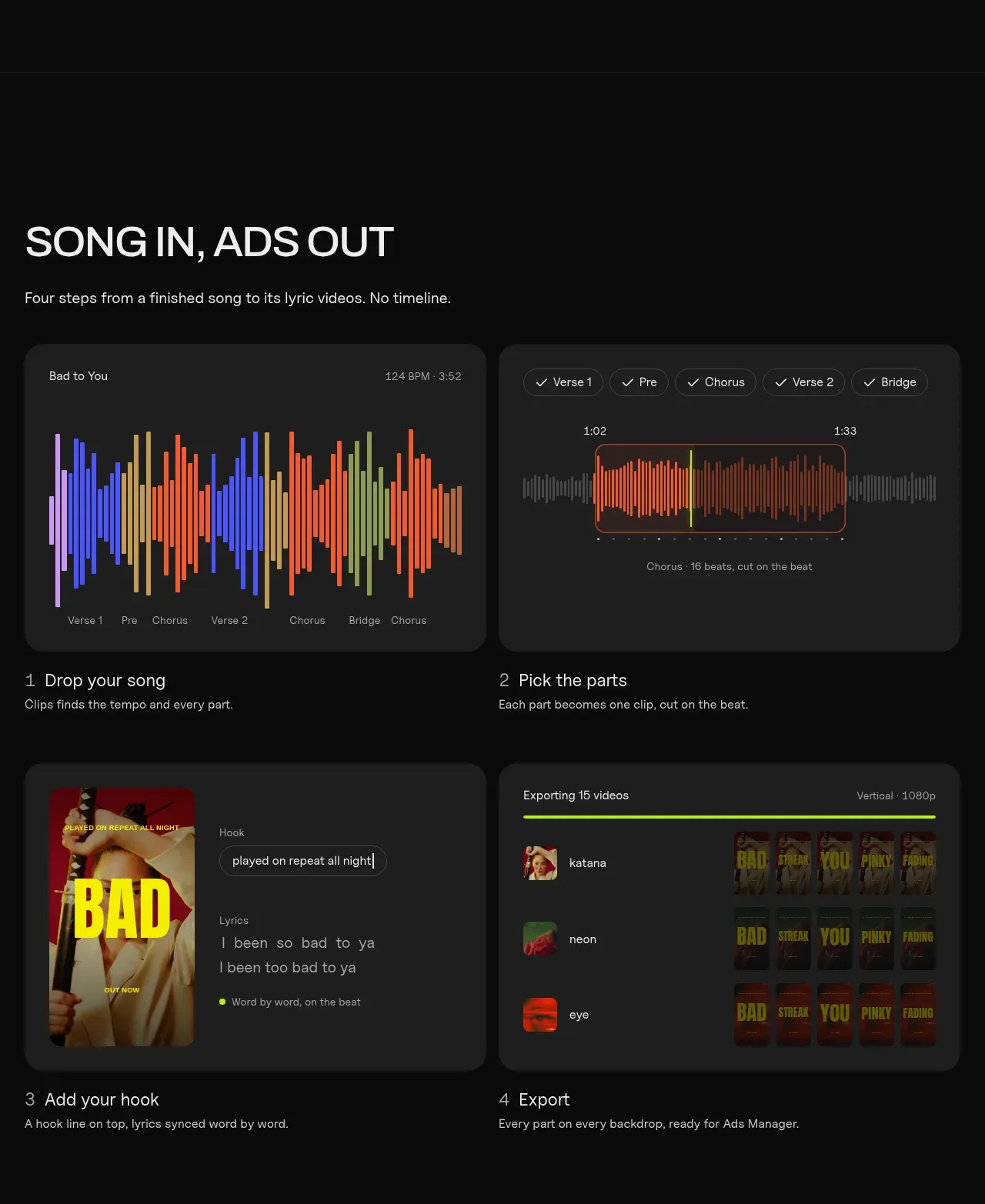 Four-step workflow
Clips by Plastic · Feature grid
Four-step workflow
Clips by Plastic · Feature grid