kage
kage
cognition.com
Design analysis
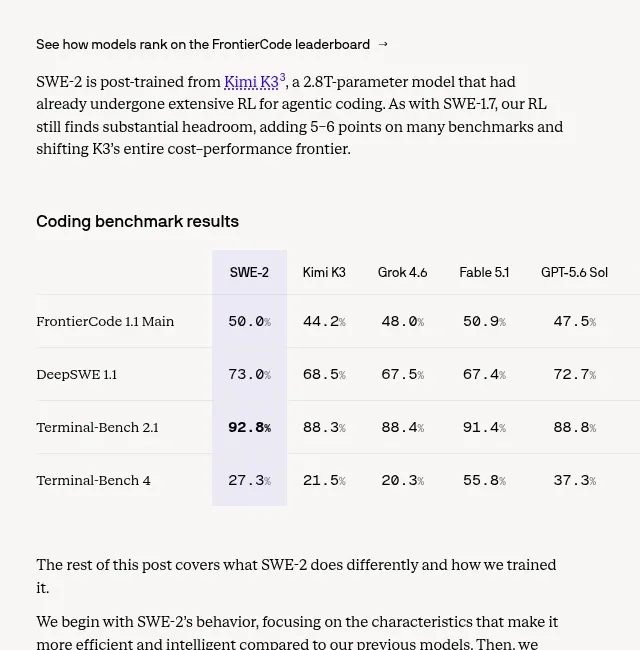
A compact comparison table gives the precise benchmark values after the visual charts, using subtle row rules and a lightly emphasized reference column.
Prompt preview
## Reference images

Study these alongside the description below: hierarchy, rhythm, spacing, colour. Build for the product you are asked about, using this design language.

- Component: https://kage-design-assets.t3.tigrisfiles.io/components/cognitions-swe-2/e9966f12-655e-494e-9580-e5330b0ddc92-1789365705-3.webp
- Full page it was cut from: https://kage-design-assets.t3.tigrisfiles.io/screenshots/cognitions-swe-2/e9966f12-655e-494e-9580-e5330b0ddc92-1789365639098-full.webp
- Component on Kage: https://kage.design/component/cognitions-swe-2-table

## Before you start
Ask what the user's product, audience, and brand are, then apply the principles below to create an original data table.

Build a readable technical benchmark table that follows a chart section. Include a descriptive heading, model columns, metric rows, aligned numeric values, and one restrained highlighted column or row for the focal result.

### Design language
- Layout: keep the table within the article measure, allow horizontal scrolling on mobile, and align all numbers by decimal point or right edge.
- Typography: 14–16px table text, 11–12px headers and units, semibold row labels; use tabular numerals.
- Spacing: 10–14px cell padding, 12–16px above the heading, and 24px below for interpretation.
- Colour: background `#f8f8f6`, ink `#222222`, secondary text `#777777`, hairlines `#e4e4df`, highlight wash `#eeeeff` or a very pale brand tint.
- Borders and radius: horizontal rules only where possible; use a 2–4px radius on the scroll container if needed.
- Interaction: sortable headers only when useful; preserve accessible table semantics and announce the highlighted metric.

### Never
- Never reuse logos, product names, copy, illustrations, or imagery from the reference.
- Never cram too many columns into a desktop-only layout.
- Never use zebra striping or saturated fills that overpower the data.