 kage
kage
contextengine.com
Design analysis
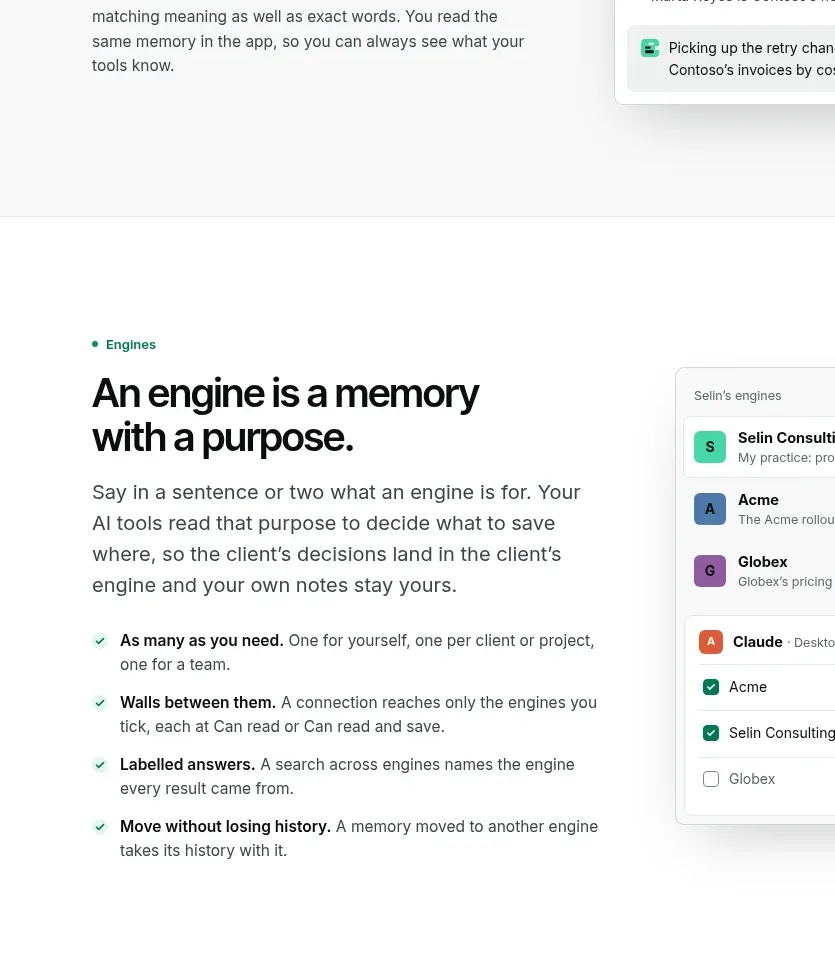
This focused feature section explains purpose-specific workspaces with a text column, checklist, and a permissions-oriented interface card.
Prompt preview
## Reference images

Study these alongside the description below: hierarchy, rhythm, spacing, colour. Build for the product you are asked about, using this design language.

- Component: https://kage-design-assets.t3.tigrisfiles.io/components/context-engine/37fe6fcb-aa91-474a-8a89-1c1cadc0a655-1792821971-4.webp
- Full page it was cut from: https://kage-design-assets.t3.tigrisfiles.io/screenshots/context-engine/37fe6fcb-aa91-474a-8a89-1c1cadc0a655-1792821825382-full.webp
- Component on Kage: https://kage.design/component/context-engine-feature-grid-3

## Before you start
Ask whether the user's product has workspaces, projects, roles, or contexts, and what separation matters to customers. Build around that model.

Create a two-column feature section on white. Place a green eyebrow, strong headline, supporting paragraph, and four concise checkmarked principles in the left column. Put a single tall interface card on the right showing a stack of named workspaces or contexts and a small permission/status area. The layout should feel operational and trustworthy, not promotional. Use black #0A0B0B, body gray #59605E, mint #35D3A0, pale green #E7F8F0, white cards, 1px #DDE4E0 borders, 10px radii, and modest shadows. Give the section 80–110px vertical padding and stack columns below 760px.

Never: use logos, product names, copy, illustrations, or imagery from the reference.
More components

 Data-room education and security overview
Papermark Data Rooms · Feature grid
Data-room education and security overview
Papermark Data Rooms · Feature grid
 Advanced data-room features
Papermark Data Rooms · Feature grid
Advanced data-room features
Papermark Data Rooms · Feature grid
 Workflow demonstrations
Papermark Data Rooms · Feature grid
Workflow demonstrations
Papermark Data Rooms · Feature grid

 Lanyard use-case feature
Badgey · Feature grid
Lanyard use-case feature
Badgey · Feature grid

 Problem statement
Clips by Plastic · Feature grid
Problem statement
Clips by Plastic · Feature grid
 Effects and customization panel
Clips by Plastic · Feature grid
Effects and customization panel
Clips by Plastic · Feature grid