kage
kage
hyperframes.dev
Design analysis
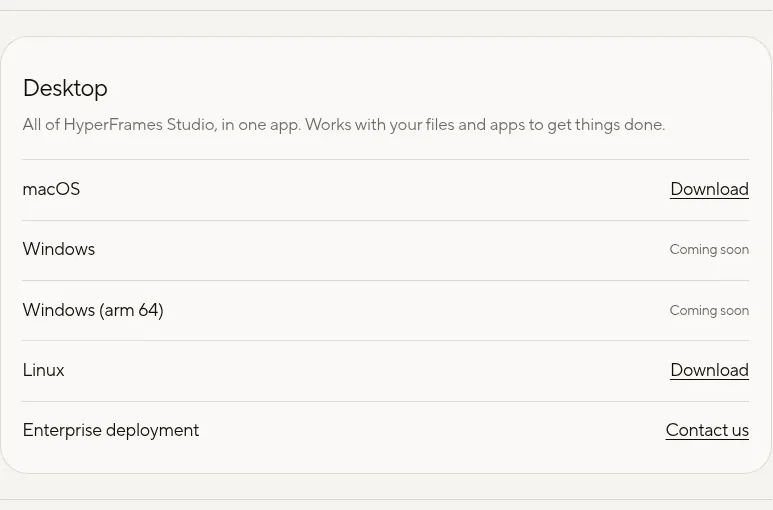
A rounded bordered card organizes operating-system availability into a scannable list, separating the platform description from individual download and contact actions.
Prompt preview
## Reference images

Study these alongside the description below: hierarchy, rhythm, spacing, colour. Build for the product you are asked about, using this design language.

- Component: https://kage-design-assets.t3.tigrisfiles.io/components/hyperframes-studio-desktop/1316fe77-e26f-4d52-97ca-5ed88a5ce9c1-1791266575-2.webp
- Full page it was cut from: https://kage-design-assets.t3.tigrisfiles.io/screenshots/hyperframes-studio-desktop/1316fe77-e26f-4d52-97ca-5ed88a5ce9c1-1791266531375-full.webp
- Component on Kage: https://kage.design/component/hyperframes-studio-desktop-card

## Before you start
Ask what platforms the user's product supports, which releases are available now, and what actions users should take. Apply the following pattern to that product and brand.

Create a compact platform-availability card with a short title and explanatory sentence at the top, followed by a vertically divided list of operating systems or deployment options. Each row should have the platform name on the left and a right-aligned action or availability status on the right. Use subtle horizontal separators, generous row height, and clear distinctions between active links, disabled/coming-soon states, and contact-sales actions.

Use the surrounding page's light neutral surface, with a white or slightly lighter card surface around `#fbfaf6`, a thin border around `#deddd7`, near-black text `#171713`, and muted status text `#817f77`. Use a 20–24px card radius, restrained shadow or no shadow, 16px inner padding, and 14–16px row typography. Make actionable labels underlined or otherwise clearly interactive; disabled states must meet contrast requirements and not appear clickable. Add hover feedback to active rows or links.

Never:
- Copy the reference's platform names, product name, copy, or exact row ordering
- Reuse the reference logo, imagery, or distinctive visual assets
- Hide availability states behind ambiguous styling