 kage
kage
openship.io
Design analysis
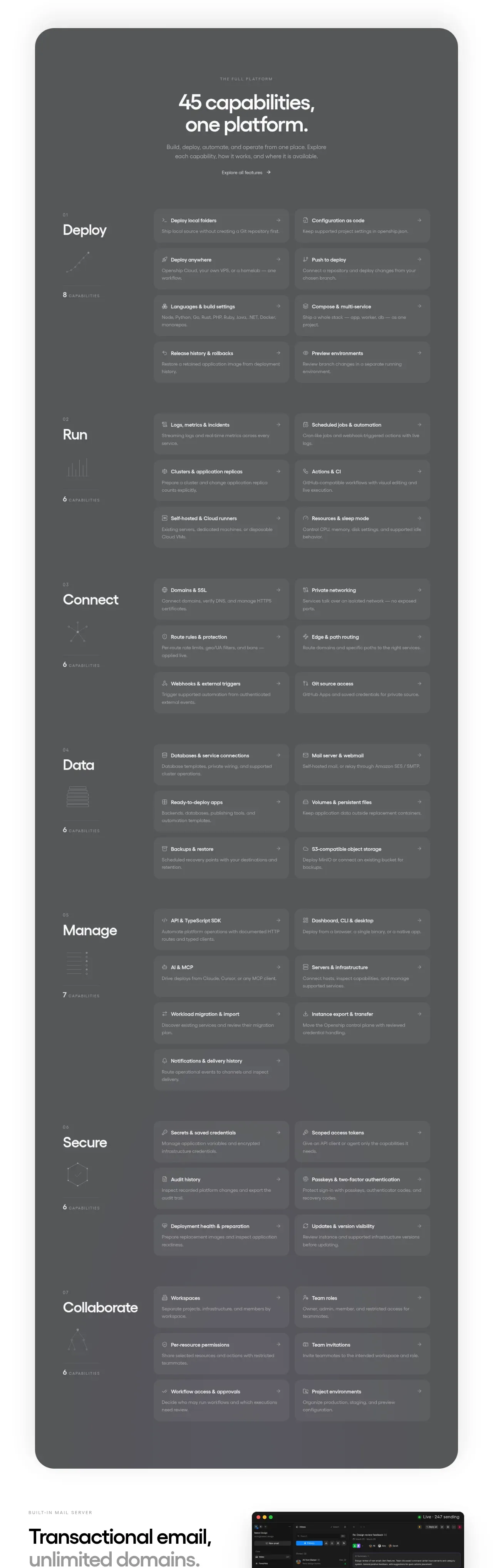
The largest section is a dark rounded platform overview organized into seven capability groups, each with a label and repeated two-column feature tiles.
Prompt preview
## Reference images

Study these alongside the description below: hierarchy, rhythm, spacing, colour. Build for the product you are asked about, using this design language.

- Component: https://kage-design-assets.t3.tigrisfiles.io/components/openship-cloud/9519eed9-0239-434c-a94e-7bf81cfc26ba-1792562629-8.webp
- Full page it was cut from: https://kage-design-assets.t3.tigrisfiles.io/screenshots/openship-cloud/9519eed9-0239-434c-a94e-7bf81cfc26ba-1792562575709-full.webp
- Component on Kage: https://kage.design/component/openship-cloud-feature-grid-2

## Before you start
Ask what the user's product and brand are, then apply the principles below to that product rather than copying the reference.

Build a long dark capability directory inside a large rounded container. Begin with a centered eyebrow, large headline, supporting paragraph, and a quiet text link. Then organize capabilities into repeated horizontal groups such as Deploy, Run, Connect, Data, Manage, Secure, and Collaborate. Each group needs a left rail with an index, title, and small count/icon, plus a two-column grid of compact feature tiles. Tiles should have translucent lighter backgrounds, subtle borders, tiny leading icons, concise titles, descriptions, and a right-aligned plus or arrow affordance. Use charcoal #56585a, white headings, muted #b5b7b8 text, and low-contrast separators. Keep group spacing consistent and collapse each group to one column on mobile; consider accordions for very narrow screens.

Never: use logos, product names, copy, illustrations, or imagery from the reference.
More components

 Discover app directory
Composio Instant · Feature grid
Discover app directory
Composio Instant · Feature grid
 Connected apps workflow
Composio Instant · Feature grid
Connected apps workflow
Composio Instant · Feature grid
 Three-part product workflow
Composio Instant · Feature grid
Three-part product workflow
Composio Instant · Feature grid
 Spending controls
Composio Instant · Feature grid
Spending controls
Composio Instant · Feature grid

 Open hardware pathways
Asimov 1 · Feature grid
Open hardware pathways
Asimov 1 · Feature grid
 Capability overview and specification cards
Asimov 1 · Feature grid
Capability overview and specification cards
Asimov 1 · Feature grid