 kage
kage
asktori.ai
Design analysis
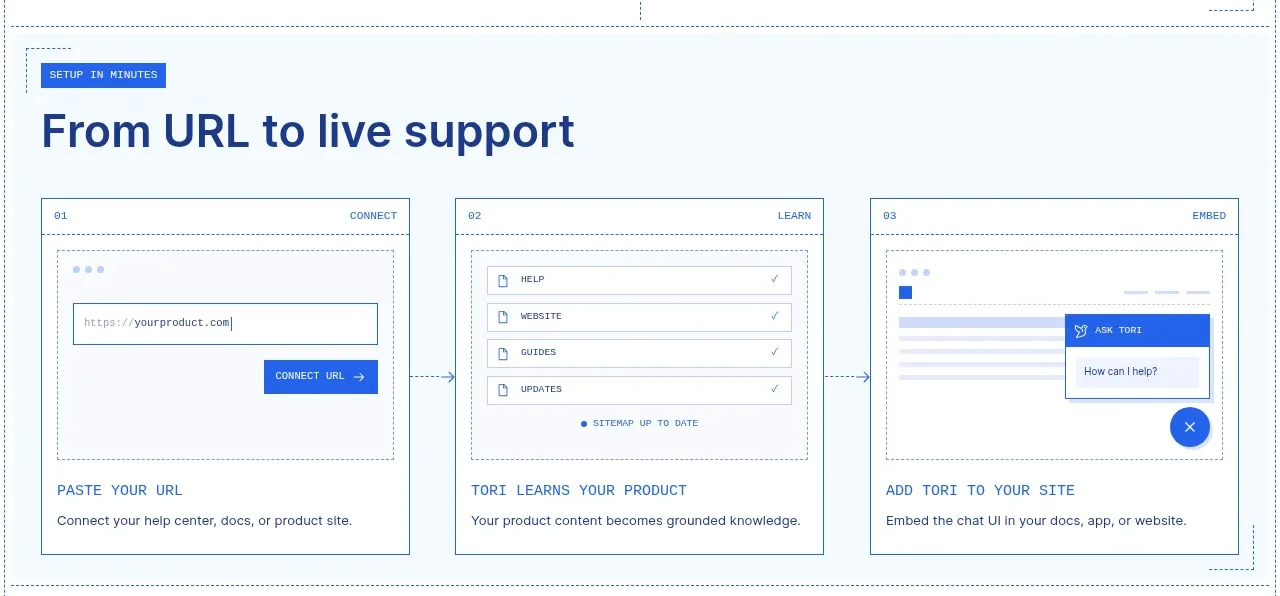
A large section explains setup as three numbered cards, each pairing a miniature UI mockup with a short title and description.
Prompt preview
## Reference images

Study these alongside the description below: hierarchy, rhythm, spacing, colour. Build for the product you are asked about, using this design language.

- Component: https://kage-design-assets.t3.tigrisfiles.io/components/tori/b048b964-21ef-4db6-a2d8-4a588d44e320-1792476376-3.webp
- Full page it was cut from: https://kage-design-assets.t3.tigrisfiles.io/screenshots/tori/b048b964-21ef-4db6-a2d8-4a588d44e320-1792476172861-full.webp
- Component on Kage: https://kage.design/component/tori-feature-grid-2

## Before you start
Ask what the user's product, audience, and brand are, then apply the principles below to create an original onboarding workflow for that product.

Create a light-blue-tinted workflow section with a small uppercase eyebrow and a large left-aligned heading around 32–38px. Below it, lay out three equal-width cards in a row with 30px gaps. Each card has a thin #6f8cae border, a numbered micro-label, a compact abstract UI preview built from neutral rectangles and controls, then an uppercase or small-caps step title and a short explanation. Keep card backgrounds white, corners square or minimally rounded at 0–4px, and use dotted internal guides sparingly. Add subtle directional connectors between cards on desktop and remove them on mobile. The sequence should communicate progressive setup from input to learning to embedding.

Never use logos, product names, copy, illustrations, or imagery from the reference.
More components

 Discover app directory
Composio Instant · Feature grid
Discover app directory
Composio Instant · Feature grid
 Connected apps workflow
Composio Instant · Feature grid
Connected apps workflow
Composio Instant · Feature grid
 Three-part product workflow
Composio Instant · Feature grid
Three-part product workflow
Composio Instant · Feature grid
 Spending controls
Composio Instant · Feature grid
Spending controls
Composio Instant · Feature grid

 Open hardware pathways
Asimov 1 · Feature grid
Open hardware pathways
Asimov 1 · Feature grid
 Capability overview and specification cards
Asimov 1 · Feature grid
Capability overview and specification cards
Asimov 1 · Feature grid