 kage
kage
asktori.ai
Design analysis
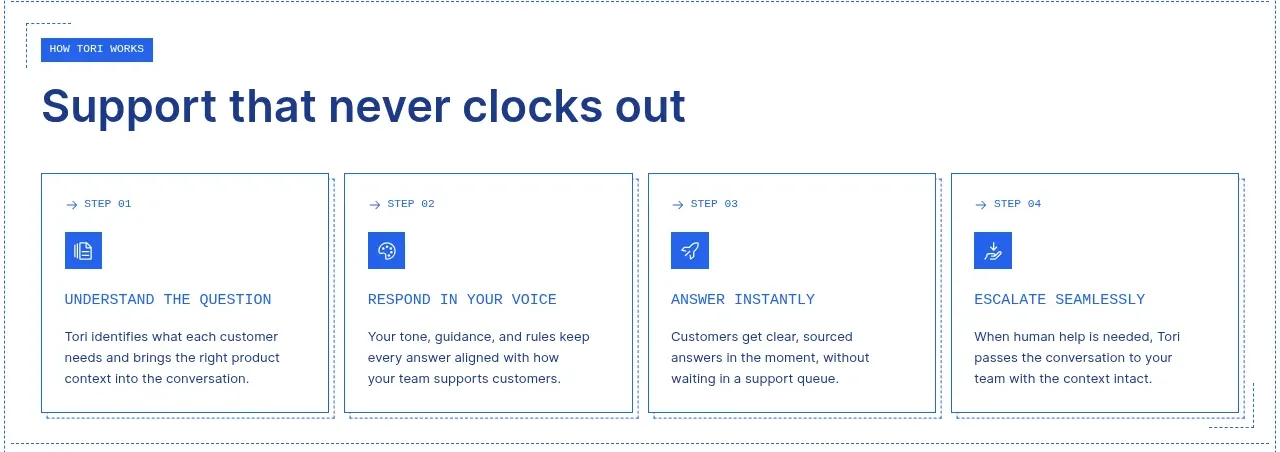
Four compact cards turn the support promise into a sequential process, with blue icons, numbered labels, and concise explanatory copy.
Prompt preview
## Reference images

Study these alongside the description below: hierarchy, rhythm, spacing, colour. Build for the product you are asked about, using this design language.

- Component: https://kage-design-assets.t3.tigrisfiles.io/components/tori/b048b964-21ef-4db6-a2d8-4a588d44e320-1792476376-4.webp
- Full page it was cut from: https://kage-design-assets.t3.tigrisfiles.io/screenshots/tori/b048b964-21ef-4db6-a2d8-4a588d44e320-1792476172861-full.webp
- Component on Kage: https://kage.design/component/tori-feature-grid-3

## Before you start
Ask what the user's product, audience, and brand are, then apply the principles below to create an original process section for that product.

Build a four-column process grid inside a white section with a small blue eyebrow and a large navy headline around 34–40px. Each equal card should have a thin gray-blue border, a tiny arrow-plus-step label, a square cobalt icon tile, an uppercase step title, and two or three lines of body copy. Use #173d78 for headings, #2160e8 for icons and accents, #d6e0e8 for borders, and 22–26px internal padding. Keep the cards mostly square and editorial rather than pill-shaped. On smaller screens, collapse to two columns then one, preserving the sequence.

Never use logos, product names, copy, illustrations, or imagery from the reference.
More components

 Discover app directory
Composio Instant · Feature grid
Discover app directory
Composio Instant · Feature grid
 Connected apps workflow
Composio Instant · Feature grid
Connected apps workflow
Composio Instant · Feature grid
 Three-part product workflow
Composio Instant · Feature grid
Three-part product workflow
Composio Instant · Feature grid
 Spending controls
Composio Instant · Feature grid
Spending controls
Composio Instant · Feature grid

 Open hardware pathways
Asimov 1 · Feature grid
Open hardware pathways
Asimov 1 · Feature grid
 Capability overview and specification cards
Asimov 1 · Feature grid
Capability overview and specification cards
Asimov 1 · Feature grid