kage
kage
umbra.masn.studio
Design analysis
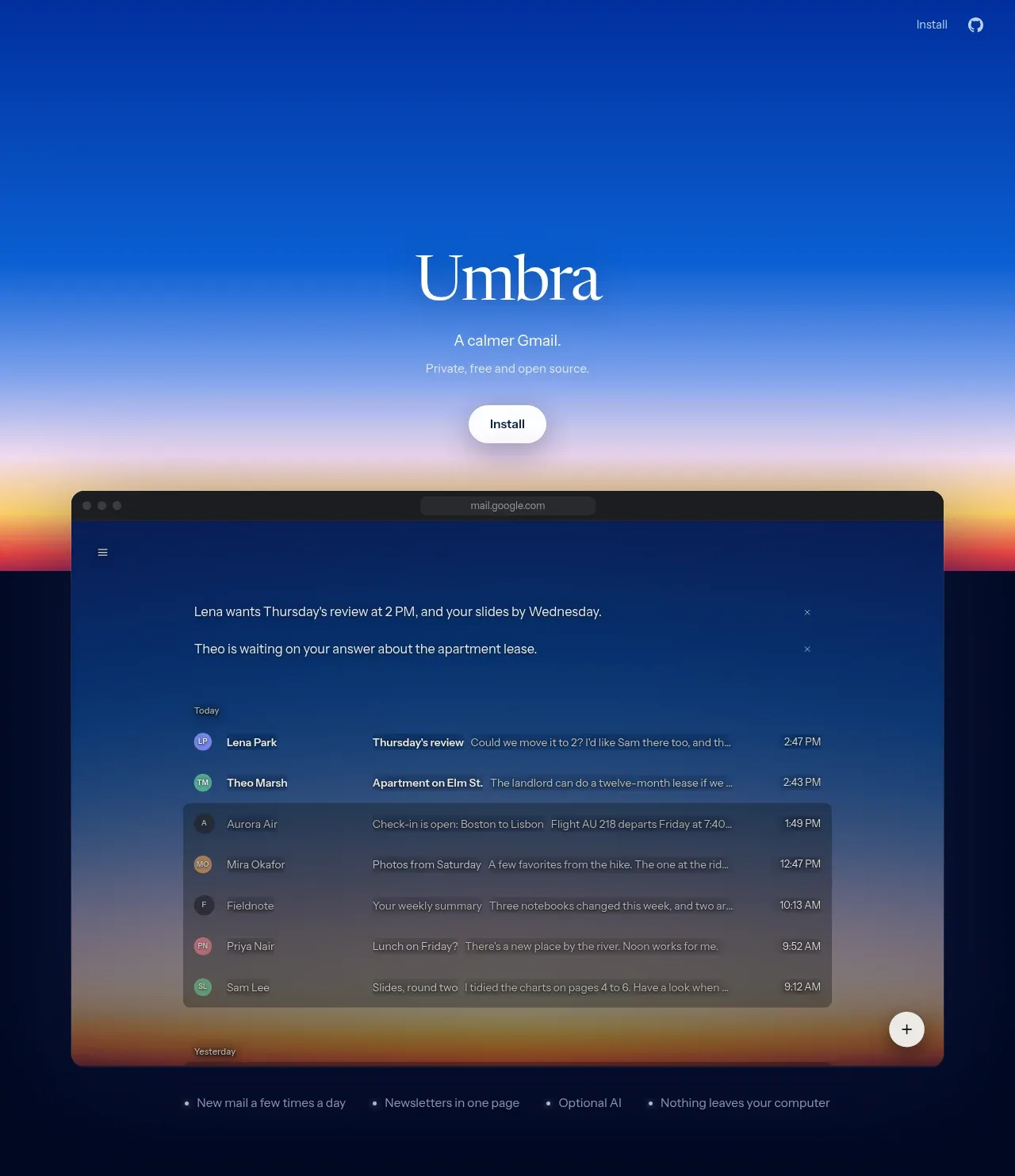
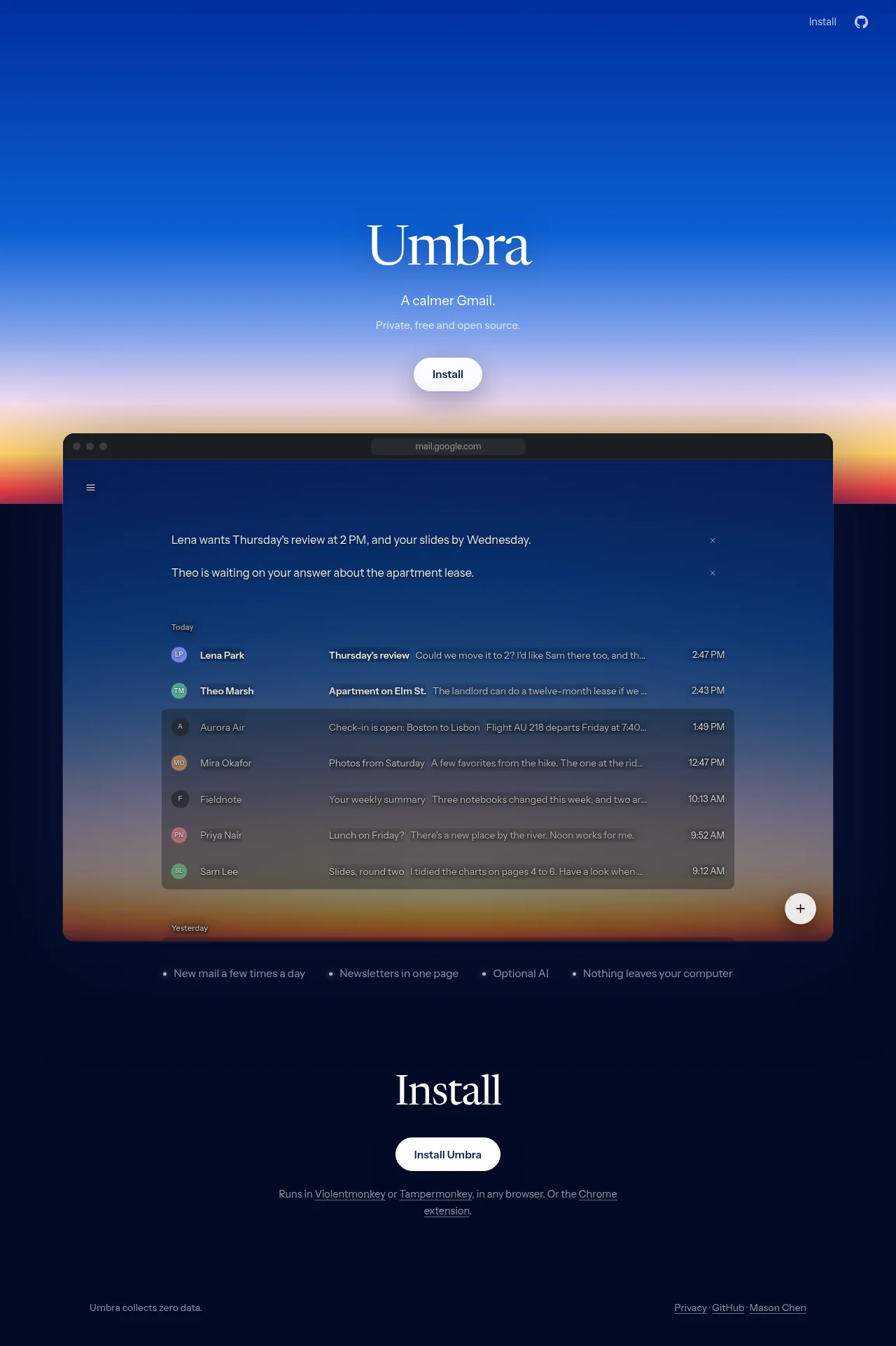
A sparse, centered landing page uses a large serif wordmark and restrained sans-serif supporting text against a vivid blue-to-lilac-to-warm-orange sky gradient. The hero transitions into a large dark browser mockup showing a calm, thread-oriented inbox, followed by a compact feature bullet row; the lower page becomes a deep navy installation section with generous vertical space and a small utility footer.
Prompt preview
## Reference images

Study these alongside the description below: hierarchy, rhythm, spacing, colour. Build for the product you are asked about, using this design language.

- Full page: https://kage-design-assets.t3.tigrisfiles.io/screenshots/umbra-mail/e5ad193a-88e6-403f-9829-5608575fa4bb-1792476206048-full.webp
- Above the fold: https://kage-design-assets.t3.tigrisfiles.io/screenshots/umbra-mail/e5ad193a-88e6-403f-9829-5608575fa4bb-1792476204372.webp
- Design on Kage: https://kage.design/designs/umbra-mail-landing-page

## Before you start
Ask the user what they are building, who it is for, and what brand assets they already have (name, colours, and type choices). Wait for their answers before designing. Apply everything below to that product, using its own content and identity rather than copying the reference.

## Page structure
1. **Top utility navigation** — Place a very small, low-contrast utility link at the upper-right, paired with a simple external/repository-style affordance; keep the rest of the navigation intentionally empty.
2. **Hero introduction** — Center a large elegant serif product heading in the upper half of a full-width atmospheric gradient. Add a short sans-serif tagline, one muted supporting line, and a compact white pill CTA stacked beneath with generous spacing.
3. **Product preview** — Overlap or place a wide browser-window mockup directly below the hero CTA. Use a dark chrome bar and a translucent, deep-blue inbox surface; show a simplified thread list with two highlighted conversational rows, sender avatars, subjects, snippets, timestamps, and a circular compose control.
4. **Feature bullets** — Under the mockup, add a single centered horizontal row of four short benefits separated by small bullet markers. Keep this area quiet and text-led rather than turning it into cards.
5. **Installation section** — Transition to a solid near-black navy background. Center a large serif “action” heading, a white rounded installation button, and a small muted explanatory line with underlined inline links.
6. **Footer** — End with a wide, sparse footer: a small privacy/data statement aligned left and a compact group of underlined resource links aligned right.

## Design language
- Build hierarchy with a dramatic serif display face for the main headings and a clean, small sans-serif for all interface text, supporting copy, metadata, and links.
- Keep the composition centered and unusually sparse above the fold, then add density only inside the browser preview; return to generous negative space in the installation section and footer.
- Use an atmospheric vertical gradient for the hero, moving from saturated cobalt blue near the top through periwinkle/lilac and pale warm peach into orange near the lower horizon; approximate stops: `#0649b8`, `#4e8fe8`, `#c7b9ec`, `#ffd4ad`, `#e16c3f`.
- Ground the lower page in a nearly black navy such as `#020b2d` or `#031033`, while using white and cool gray-blue text with reduced opacity for secondary information.
- Pair a high-contrast editorial serif at large sizes for headings with a neutral sans-serif around 12–16px for body copy; use compact line lengths and restrained letter spacing.
- Make primary actions white pills with dark text, medium weight, subtle shadow, and generous horizontal padding. Keep secondary links understated and underlined rather than brightly coloured.
- Treat the product preview as the main visual object: use a wide rounded browser frame, dark translucent surfaces, faint borders, soft blur/transparency, and small-radius controls. Avoid heavy card systems elsewhere.
- Use thin, low-contrast separators and minimal shadows; reserve stronger contrast for the browser mockup against the gradient and for the white CTAs against the navy background.
- Represent interface data with small circular initials/avatars, compact rows, muted snippets, and clear timestamp alignment. Keep the inbox calm and legible rather than dense or dashboard-like.
- Preserve a slow, quiet interaction feel: buttons may lift subtly on hover, links can brighten or underline smoothly, and the preview can use restrained fade/float motion; avoid energetic transitions or decorative animation.

## Never
- Do not use logos, wordmarks, product names, copy, illustrations, photography, or icon sets from the reference.
- Do not present the result as Umbra Mail or imply an affiliation with it.
- Do not reproduce the reference email addresses, inbox text, exact branding, or repository marks; create equivalent content for the user’s product instead.