kage
kage
buddy.works
Design analysis
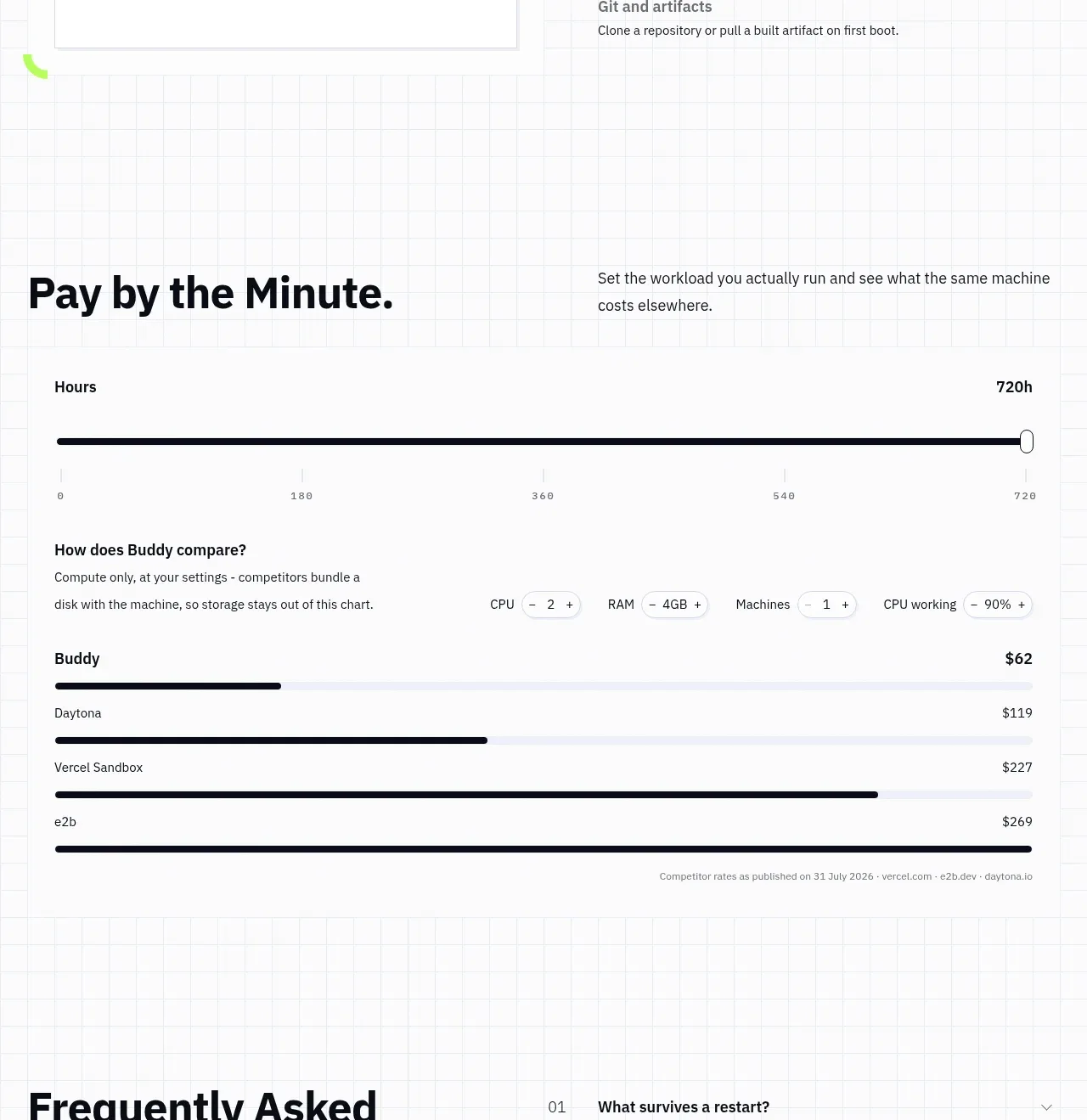
An interactive calculator-style panel explains minute-based usage, exposes adjustable controls, and compares the resulting cost against alternatives with horizontal bars.
Prompt preview
## Reference images

Study these alongside the description below: hierarchy, rhythm, spacing, colour. Build for the product you are asked about, using this design language.

- Component: https://kage-design-assets.t3.tigrisfiles.io/components/ai-sandboxes-by-buddy/f0e6e8b3-2b0a-4e1e-b3c7-06d5e5447056-1792130830-8.webp
- Full page it was cut from: https://kage-design-assets.t3.tigrisfiles.io/screenshots/ai-sandboxes-by-buddy/f0e6e8b3-2b0a-4e1e-b3c7-06d5e5447056-1792130620611-full.webp
- Component on Kage: https://kage.design/component/ai-sandboxes-by-buddy-chart

## Before you start
Ask what the user's pricing model is, which variables users can adjust, and which comparison data is trustworthy. Then build a transparent calculator rather than copying the reference.

Create a pricing comparison section with an editorial heading and supporting paragraph above a large bordered calculator panel. Include a prominent range slider with a labeled unit and min/max tick labels, compact stepper controls for relevant variables, and a comparison list using horizontal bars. Clearly distinguish the user's product with a dark bar and competitors with progressively lighter bars. Use white and #F8FAFB surfaces, 1px #D7DCE1 borders, black #11131A text, lime #B9FF4A for the main product, and subtle lavender/gray for context. Sliders and steppers must be keyboard accessible, show focus rings, and update totals live. Keep explanatory footnotes small and muted. On mobile, make the controls stack and preserve readable bar labels.

Never: use the reference's product name, exact prices, exact competitor names, exact copy, illustrations, or imagery.