kage
kage
flyweel.co
Design analysis
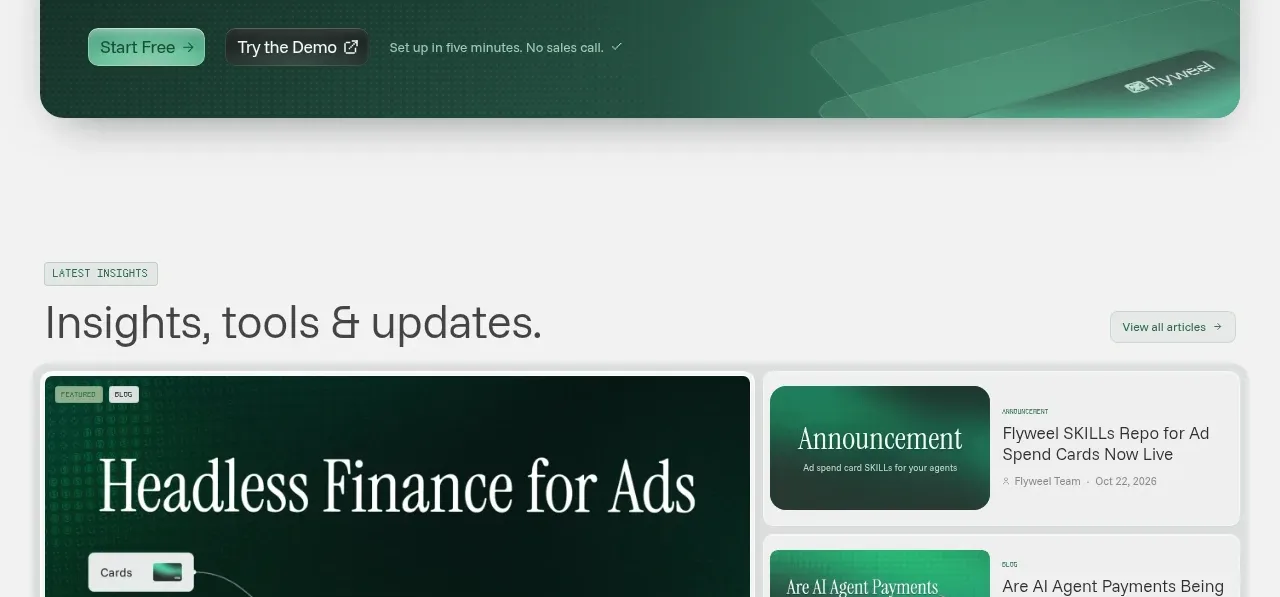
An editorial resources section uses one large featured article beside three smaller article cards, with a heading and view-all action.
Prompt preview
## Reference images

Study these alongside the description below: hierarchy, rhythm, spacing, colour. Build for the product you are asked about, using this design language.

- Component: https://kage-design-assets.t3.tigrisfiles.io/components/flyweel/865e3c33-9e14-4c9c-942f-392b2bfd1af5-1792649015-8.webp
- Full page it was cut from: https://kage-design-assets.t3.tigrisfiles.io/screenshots/flyweel/865e3c33-9e14-4c9c-942f-392b2bfd1af5-1792648958364-full.webp
- Component on Kage: https://kage.design/component/flyweel-gallery

## Before you start
Ask what the user's product and brand are, then apply the principles below to that context rather than reproducing this reference.

Build an insights gallery in a centered container. Add a small uppercase eyebrow, a prominent section title, and a view-all button on the same row. Below, use a two-column layout: one large featured article card with a visual thumbnail, title, metadata, and read action; beside it, stack three compact cards with thumbnail, category, title, and date. Use white cards, 12–16px radii, pale borders, subtle shadow, and a dark green featured thumbnail with abstract generated texture. Keep metadata small and muted, and make every card keyboard-focusable. Collapse the stack below the feature on mobile.

Never: use logos, product names, copy, illustrations, or imagery from the reference.