kage
kage
resend.com
Design analysis
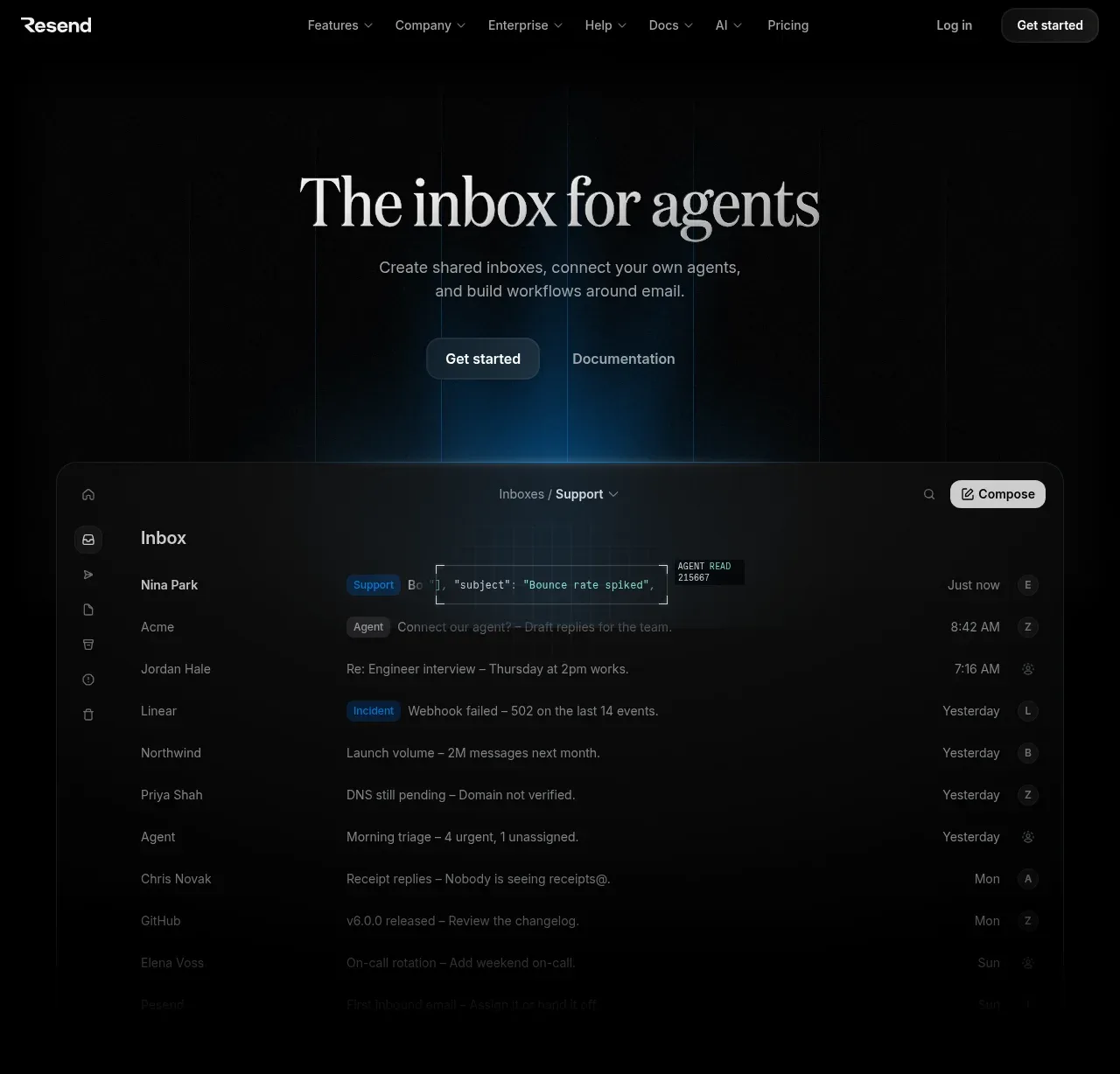
The hero pairs a large editorial headline and concise supporting copy with dual actions, then transitions into a large inbox product preview against a subtle blue glow and grid treatment.
Prompt preview
## Reference images

Study these alongside the description below: hierarchy, rhythm, spacing, colour. Build for the product you are asked about, using this design language.

- Component: https://kage-design-assets.t3.tigrisfiles.io/components/resend-inboxes/352e3462-9455-4ac7-822b-63aef1588265-1792735564-1.webp
- Full page it was cut from: https://kage-design-assets.t3.tigrisfiles.io/screenshots/resend-inboxes/352e3462-9455-4ac7-822b-63aef1588265-1792735452629-full.webp
- Component on Kage: https://kage.design/component/resend-inboxes-hero

## Before you start
Ask what the user's product does, who the target audience is, and what brand and visual language should guide the hero. Then create an original hero using these principles.

Create a dark, centered product hero beginning directly below the navigation. Use generous vertical whitespace, a large high-contrast serif or distinctive display headline, a short muted sans-serif supporting paragraph, and two actions: one filled primary button and one quiet text/link action. Keep the text block centered within a constrained max-width around 620px. Below it, place a wide rounded product UI preview that occupies most of the content width; let it emerge from a subtle radial blue glow (#063c63 to transparent) and faint vertical/grid lines (#15222a). Use a near-black background (#030303), white headline text (#f1f1f1), muted copy (#9b9b9b), thin borders (#202020), 14–16px corner radii, and soft shadows. The preview should communicate a realistic inbox with sidebar, rows, tags, timestamps, and a compose control. On small screens stack the content and crop the preview safely rather than shrinking all text.

Never: use the reference logo, product name, exact copy, exact inbox data, illustrations, imagery, or screenshots.