kage
kage
asktori.ai
Design analysis
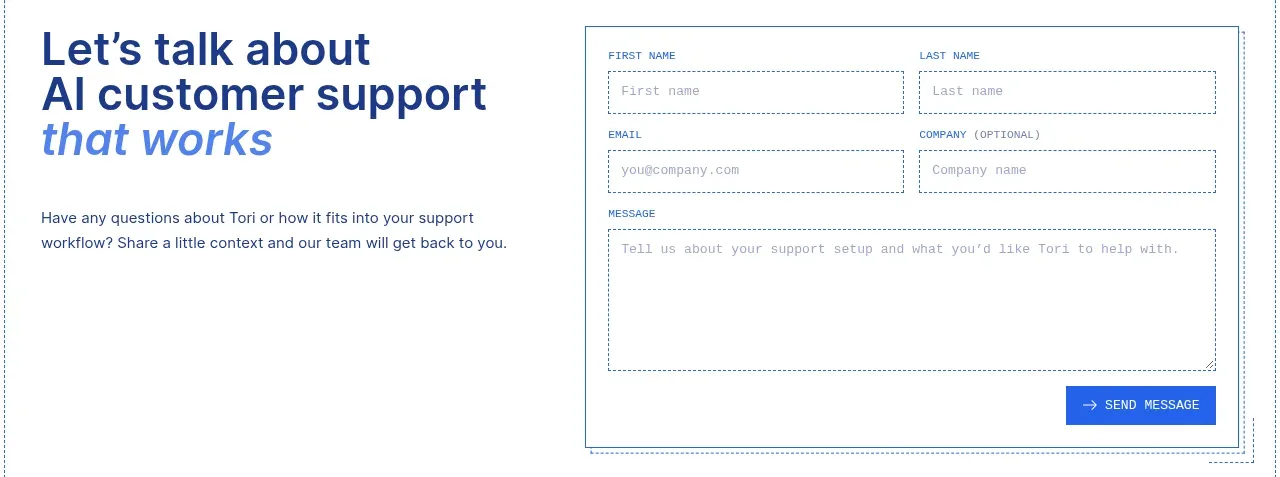
The closing conversion band pairs a large editorial invitation on the left with a structured multi-field message form on the right.
Prompt preview
## Reference images

Study these alongside the description below: hierarchy, rhythm, spacing, colour. Build for the product you are asked about, using this design language.

- Component: https://kage-design-assets.t3.tigrisfiles.io/components/tori/b048b964-21ef-4db6-a2d8-4a588d44e320-1792476378-9.webp
- Full page it was cut from: https://kage-design-assets.t3.tigrisfiles.io/screenshots/tori/b048b964-21ef-4db6-a2d8-4a588d44e320-1792476172861-full.webp
- Component on Kage: https://kage.design/component/tori-form

## Before you start
Ask what the user's product, audience, brand, and desired lead workflow are, then apply the principles below to create an original contact section for that product.

Build a two-column contact section with a large left-aligned headline around 32–40px, using navy and a pale-blue italic emphasis, followed by a short explanatory paragraph. On the right, place a bordered white form panel with a two-column first-name/last-name row, a two-column email/company row, a full-width message textarea, and a right-aligned cobalt submit button. Use 12–14px labels in a technical uppercase style, 13px inputs, dotted or dashed #9cafbd input borders, 18–22px panel padding, and a 1px outer border. Keep controls high contrast, clearly labeled, keyboard accessible, and stack the form below the copy on mobile.

Never use logos, product names, copy, illustrations, or imagery from the reference.